The organization I work for uses a Cisco ASA VPN network appliance for managing
remote VPN access to the internal network. This is a common and popular choice
for many organizations. When you access it remotely for the first time, it
wants to detect your platform and then download and install the AnyConnect
Secure Mobility Client. This client application is how you then connect and
authenticate your VPN connection. Our organization assumes that everyone in
the world uses Microsoft Windows all the time. Of course, why not?
Anyway, the Java-based client and installer do not work too well on Linux
for some reason. And our organization in particular is not too keen on helping
anyone who is not using Windows. They do not prohibit the use of Linux or other
operating systems, but they will not help you with them either.
So a couple years ago, whatever black magic they had been performing to make
Linux clients work stopped. Our team uses Linux and we were suddenly locked out
of VPN access. And they did not care despite out best pleading. In fact, their
final, formal answer on the matter was to "just use Windows". Nice. Thanks.
So we started digging around the interwebs and found that a lot of other Linux
users had the same story in regards to the Cisco AnyConnect client. And some of
them had gotten fed up enough to devise their own solution. We discovered a
project called 'openconnect'. This is an open-source program that is compatible
with the Cisco VPN appliance.
OpenConnect is not part of most Linux distros including RHEL, but you can now
get an rpm from EPEL. You can also build it from source if you desire.
OpenConnect uses OpenSSL which must be able to validate the signing chains on al
l the certificates involved. Our organization uses smart cards with security
certificates, so a VPN connection involves you presenting a client-side SSL
certificate. This means you need to have all the signing certificates up to the
root installed in your local store.
These go under the /etc/pki/ca-trust/source/anchors directory.
You simply copy the .cer certificate files there and then update using the
'update-ca-trust' command.
Then the command line to use openconnect looks like this.
You will need root privilege.
sudo openconnect -c 'pkcs11:token=LAST.FIRST.MIDDLE.number;id=%02' https://vpn.foo.org
It prompts for the sudo password and then for the PIN on the smart card and
then it connects.
One tricky point is the 'pkcs11' parameter. You need to see exactly what your
token name and id number on the card are so you can reference them to the
openconnect command parameters.
With your card inserted, you can use 'p11tool' to get a list of all the
specific certificates on the card and their 'id' values.
p11tool --list-tokens
p11tool --list-all-certs pkcs11:token=LAST.FIRST.M.123456789
It should list some number of "objects", which are the certificates on your
card. If you don't know which one of these the VPN is expecting for
authentication, you can always use some trial-and-error experimenting.
There are not so many on there that this is prohibitive.
Now look at the 'ID' field for that object, e.g. "00:02".
You need to replace the "00:02" with "%02" in the 'id' portion of the pkcs11
string.
If you get the 'id=' syntax wrong, you will get some non-obvious errors from
openconnect and then a WebVPN cookie error and no connection.
We also ran into difficulty with some applications communicating over the VPN.
The problem is that the VPN tunnel uses DTLS over UDP. This requires a little
overhead for some protocol headers and starts eating up your MTU.
Your application has no idea it's using a somewhat limited connection and does
not account for this. So if its protocol also has some headers, you may have to
tweak the MTU down to account for that.
You can tweak the MTU on the tun0 device established by openconnect.
sudo ip link set mtu 1402 dev tun0
An example is newer versions of OpenSSH whose key exchange algorithms have
rather large payloads. When these get fragmented over the DTLS/UDP connection
while communicating with an older version of OpenSSH on the server side,
something goes wrong, the key exchange stalls, times out and then fails.
You can edit the SSH config to not offer so many choices in the key exchange,
but it is simpler to bump the MTU down until it's happy. This is easily done by iterative experiments until it works.
Thursday, February 2, 2017

Other authentication factors
In computer security, when we talk about authentication factors it is usually
the traditional "something you know", "something you have" and "something you
are" (i.e biometrics). There are other things being used as types of factors
more recently.
First up are behavioral factors, which are they way you do something.
This must be something that can be reasonably uniquely attributed to you and
only you. Some examples are your keyboard typing patterns, touch surface swiping
patterns, maybe how you typically interact with some graphical user interface.
The point is that, in theory, no two people use these interfaces exactly the
same way and that means the uniqueness can be used as a form of authentication.
Some systems are even using this as a means of "continuous authentication".
After your initial access to the system, the behavior is tracked throughout
use and if it suddenly doesn't look like you any more, then you could be asked
to reauthenticate. I have to wonder how robust this really is. Unlike a
cryptographically strong hash, we don't have any way to prove anything about it.
I think it's just too new for that yet. But I do agree that it is a promising
approach. The overly paranoid might not like it. It could be seen as yet another
intrusion into their privacy and another way they could be tracked or
identified. The EFF has a project that demonstrates just how unique a
fingerprint your web browser presents regardless of which site or page you are
visiting. If multiple sites started sharing and correlating behavioral
measurements, that is one more way you can be tracked across multiple systems
to build a bigger profile of you.
Another factor is location. This could be a geographical location or a logical
network location (i.e. only from certain IP addresses or networks). These days,
a lot of computers either have GPS or an estimate of position based on knowing
where your general area your IP address is in. I play Blizzard games through
their Battle.net site and if they see me come in from a different IP address
than I usually do (maybe I'm visiting relatives and using their computer),
it will challenge me for extra authentication to make sure someone else has not
hacked my account. Of course, it is possible to spoof these mechanisms if you
can hack your local device to report the expected location or spoof the IP
address.
A slight variation on this is the "remember this device" mechanism.
You go through a full authentication once and then tell the site that this
device is a trusted device. Future logins do not ask for all the authentication
factors. This is a convenience for your home computer, tablet, phone, etc.
You assume the risk by protecting access to your devices in trade for more
convenient access. Once again we see the balance between usability and security.
I have had difficulty with this mechanism over time. The "remembering" tends
to fail under various circumstances like software upgrades, maybe an eventual
timeout and so on. This tends to happen with no notice and after you got used
to the convenience it is a jarring pothole in the usability road.
the traditional "something you know", "something you have" and "something you
are" (i.e biometrics). There are other things being used as types of factors
more recently.
First up are behavioral factors, which are they way you do something.
This must be something that can be reasonably uniquely attributed to you and
only you. Some examples are your keyboard typing patterns, touch surface swiping
patterns, maybe how you typically interact with some graphical user interface.
The point is that, in theory, no two people use these interfaces exactly the
same way and that means the uniqueness can be used as a form of authentication.
Some systems are even using this as a means of "continuous authentication".
After your initial access to the system, the behavior is tracked throughout
use and if it suddenly doesn't look like you any more, then you could be asked
to reauthenticate. I have to wonder how robust this really is. Unlike a
cryptographically strong hash, we don't have any way to prove anything about it.
I think it's just too new for that yet. But I do agree that it is a promising
approach. The overly paranoid might not like it. It could be seen as yet another
intrusion into their privacy and another way they could be tracked or
identified. The EFF has a project that demonstrates just how unique a
fingerprint your web browser presents regardless of which site or page you are
visiting. If multiple sites started sharing and correlating behavioral
measurements, that is one more way you can be tracked across multiple systems
to build a bigger profile of you.
Another factor is location. This could be a geographical location or a logical
network location (i.e. only from certain IP addresses or networks). These days,
a lot of computers either have GPS or an estimate of position based on knowing
where your general area your IP address is in. I play Blizzard games through
their Battle.net site and if they see me come in from a different IP address
than I usually do (maybe I'm visiting relatives and using their computer),
it will challenge me for extra authentication to make sure someone else has not
hacked my account. Of course, it is possible to spoof these mechanisms if you
can hack your local device to report the expected location or spoof the IP
address.
A slight variation on this is the "remember this device" mechanism.
You go through a full authentication once and then tell the site that this
device is a trusted device. Future logins do not ask for all the authentication
factors. This is a convenience for your home computer, tablet, phone, etc.
You assume the risk by protecting access to your devices in trade for more
convenient access. Once again we see the balance between usability and security.
I have had difficulty with this mechanism over time. The "remembering" tends
to fail under various circumstances like software upgrades, maybe an eventual
timeout and so on. This tends to happen with no notice and after you got used
to the convenience it is a jarring pothole in the usability road.
Wednesday, February 1, 2017
Multi-factor Identification
In the security realm, we talk a lot about multi-factor authentication, but you
can also use multiple factors for identification. Why would we care about that?
If a guy shows up and claims to be "Joe", we take his word for it as long as he
can successfully authenticate using Joe's password, token, biometric, etc.
In other words anyone possessing matching authentication factors is assumed to
be Joe. But maybe he stole Joe's factors? Even some biometrics have been stolen
in both fiction and the real world. Remember Wesley Snipes stealing a guy's
eyeball in the movie Demolition Man? He holds it up to the iris scanner on a
ball-point pen. Nice. And a couple years back, I recall an article about some
thieves cutting off a guy's finger to steal his car whose locks and/or ignition
were biometric fingerprint scanners. So much for convenience. A key can be
replaced. Just saying.
In some applications, we only care about proper authentication and just take the
identification for granted. This is the case when logging into any computer
system, web site, and so forth. But in other cases, it may be really important
to correctly identify someone. In fact, there may not even be any authentication
involved if it's not a security situation. A family member was recently
hospitalized and during the admission process we discovered the hospital had
recently upgraded their check in process with a palm vein scanner. My first
instinct was to figure it had to do with authorizing access to health records.
No, it was to be used in any future admissions for positive and more accurate
patient identification. I thought why not use a fingerprint or something?
It turns out that the palm vein scanning is particularly useful in a medical
environment. The scanner works by using an infrared wavelength to record a
picture of the vein pattern in your palm. This pattern remains the same
throughout your life and can be read even through damaged skin (cut, burned, etc
). And a biometric works even if you are unconscious and there's no one else
present who knows you. So unless your entire hand is damaged, it makes a really
good choice. This particular scanner worked only on the right hand. I asked the
admissions person what about people who were missing their right hand? She sort
of stumbled on that and said they would "figure something out". :)
From a security perspective, it is highly unlikely that someone would want to
obtain a false admission to the hospital. Do you know why Joe was supposed to
be checking in? Maybe you're about to have your heart replaced. Yeah, I don't
see anyone abusing this. And you really don't need multi-factor identification
in a computer application. It would really just end up serving as yet another
authentication factor. Suppose you had to present a user name and biometric first
and then give the authentication factors associated with that pair. How is that
any different from giving only a user name and then one more authentication
factor? It's not. So identification is about getting the correct record, not
about whether you should or shouldn't. In the hospital case, the admissions
person already has permission, so they don't need you to authenticate anything.
can also use multiple factors for identification. Why would we care about that?
If a guy shows up and claims to be "Joe", we take his word for it as long as he
can successfully authenticate using Joe's password, token, biometric, etc.
In other words anyone possessing matching authentication factors is assumed to
be Joe. But maybe he stole Joe's factors? Even some biometrics have been stolen
in both fiction and the real world. Remember Wesley Snipes stealing a guy's
eyeball in the movie Demolition Man? He holds it up to the iris scanner on a
ball-point pen. Nice. And a couple years back, I recall an article about some
thieves cutting off a guy's finger to steal his car whose locks and/or ignition
were biometric fingerprint scanners. So much for convenience. A key can be
replaced. Just saying.
In some applications, we only care about proper authentication and just take the
identification for granted. This is the case when logging into any computer
system, web site, and so forth. But in other cases, it may be really important
to correctly identify someone. In fact, there may not even be any authentication
involved if it's not a security situation. A family member was recently
hospitalized and during the admission process we discovered the hospital had
recently upgraded their check in process with a palm vein scanner. My first
instinct was to figure it had to do with authorizing access to health records.
No, it was to be used in any future admissions for positive and more accurate
patient identification. I thought why not use a fingerprint or something?
It turns out that the palm vein scanning is particularly useful in a medical
environment. The scanner works by using an infrared wavelength to record a
picture of the vein pattern in your palm. This pattern remains the same
throughout your life and can be read even through damaged skin (cut, burned, etc
). And a biometric works even if you are unconscious and there's no one else
present who knows you. So unless your entire hand is damaged, it makes a really
good choice. This particular scanner worked only on the right hand. I asked the
admissions person what about people who were missing their right hand? She sort
of stumbled on that and said they would "figure something out". :)
From a security perspective, it is highly unlikely that someone would want to
obtain a false admission to the hospital. Do you know why Joe was supposed to
be checking in? Maybe you're about to have your heart replaced. Yeah, I don't
see anyone abusing this. And you really don't need multi-factor identification
in a computer application. It would really just end up serving as yet another
authentication factor. Suppose you had to present a user name and biometric first
and then give the authentication factors associated with that pair. How is that
any different from giving only a user name and then one more authentication
factor? It's not. So identification is about getting the correct record, not
about whether you should or shouldn't. In the hospital case, the admissions
person already has permission, so they don't need you to authenticate anything.
Monday, January 23, 2017
Digital Estates
I think most people are familiar with the notion of creating wills, powers of attorney, trusts and such to manage their physical and financial estate in the event of their incapacitation or demise. Written instructions carry legal weight for your survivors which minimizes uncertainty of ownership and helps keep the vultures from stealing your hard-earned loot from your family. In modern times, there is another factor to consider, your digital estate. What is that?
The days, we may have a large number of online accounts established for banking and other financial institutions, Facebook, Amazon and so forth where a wealth of information about us resides. Some of them may be access to large collections of digital media (books, movies, music, etc). If you cease to be, what happens to all that stuff? To some, it could be just as important as that baseball card collection. But unlike the baseball cards, it's not something you left in boxes at the house. Your successors will need access to all those online treasure troves.
So somehow, you need to leave them a list of accounts along with the usernames, passwords and any second authentication factors. The first, best step is to use a password manager as detailed in previous posts on this blog. This keeps the entire list in one place along with all the supporting information. Unlike the baseball cards, however, this presents some additional challenges.
First, consider that while you're still here, you will be updating this database periodically with new accounts, changed passwords and so forth. So you cannot just put a copy on a CD and put that in a safe or tell the relatives to hang on to it "just in case". It will go stale and some of it may become useless. So you need to document where the latest version should be along with the location of any backups of it. And it is not just the content of the database that may change. Good security practice is to change the master password occasionally. So you cannot just tell them where the file is and hand them a copy of the password even if it is encrypted or otherwise obfuscated.
Second, consider anything that uses two-factor authentication. What are the second factors? Yubikeys, perhaps authenticator apps on your cell phone, some other OTP token and so forth. You can document what to use in the database, but they have to lay hands on it. Where did it go? And if it cannot be found, is there an access recovery procedure that can be followed? Document it. Make sure all relevant information like security questions and answers are documented in the database too.
So the strategy I chose was to establish a second password database whose sole purpose was to hold the master password of the main database. The password for this database is extremely strong as a maximum length, randomly generated string. So I can change the master password of the primary database and just remember to update the secondary database. This secondary database password was printed as part of a letter stored with my estate attorney. If I did want to change this password, it just takes an update to the letter as well. This second database still requires the same second factor of the Yubikey. So I trust the lawyer to a point and if anything untoward happened, he would be the first suspect reported to the police. And he does not possess a copy of either database or the second factor. The family can get this key and with instructions start unraveling the puzzle to get full access to everything. In the event of loss of the Yubikey, there is a separate recovery passcode stored in a separate, secure location (i.e. not even with the lawyer), but documented for the family.
This may all seem a bit extreme or paranoid-ish, but I think it's a reasonable way to leave access without compromising my living, daily use.
The days, we may have a large number of online accounts established for banking and other financial institutions, Facebook, Amazon and so forth where a wealth of information about us resides. Some of them may be access to large collections of digital media (books, movies, music, etc). If you cease to be, what happens to all that stuff? To some, it could be just as important as that baseball card collection. But unlike the baseball cards, it's not something you left in boxes at the house. Your successors will need access to all those online treasure troves.
So somehow, you need to leave them a list of accounts along with the usernames, passwords and any second authentication factors. The first, best step is to use a password manager as detailed in previous posts on this blog. This keeps the entire list in one place along with all the supporting information. Unlike the baseball cards, however, this presents some additional challenges.
First, consider that while you're still here, you will be updating this database periodically with new accounts, changed passwords and so forth. So you cannot just put a copy on a CD and put that in a safe or tell the relatives to hang on to it "just in case". It will go stale and some of it may become useless. So you need to document where the latest version should be along with the location of any backups of it. And it is not just the content of the database that may change. Good security practice is to change the master password occasionally. So you cannot just tell them where the file is and hand them a copy of the password even if it is encrypted or otherwise obfuscated.
Second, consider anything that uses two-factor authentication. What are the second factors? Yubikeys, perhaps authenticator apps on your cell phone, some other OTP token and so forth. You can document what to use in the database, but they have to lay hands on it. Where did it go? And if it cannot be found, is there an access recovery procedure that can be followed? Document it. Make sure all relevant information like security questions and answers are documented in the database too.
So the strategy I chose was to establish a second password database whose sole purpose was to hold the master password of the main database. The password for this database is extremely strong as a maximum length, randomly generated string. So I can change the master password of the primary database and just remember to update the secondary database. This secondary database password was printed as part of a letter stored with my estate attorney. If I did want to change this password, it just takes an update to the letter as well. This second database still requires the same second factor of the Yubikey. So I trust the lawyer to a point and if anything untoward happened, he would be the first suspect reported to the police. And he does not possess a copy of either database or the second factor. The family can get this key and with instructions start unraveling the puzzle to get full access to everything. In the event of loss of the Yubikey, there is a separate recovery passcode stored in a separate, secure location (i.e. not even with the lawyer), but documented for the family.
This may all seem a bit extreme or paranoid-ish, but I think it's a reasonable way to leave access without compromising my living, daily use.
Thursday, January 19, 2017
Financial Aggregators and Security
A lot of us like to use software to manage our financial accounts, budgets and/or investments. It helps keep track of bills, loan, the current value of assets, spending vs income, your current net worth and so forth. This software comes in two basic forms. You either have a local software application or you use some manner of web-based service.
Long before the advent of the web, there were just standalone applications. Intuit's Quicken and Microsoft's Money were the big two with some other less capable things on the fringe. When common, public internet access came around in the early-to-mid 90s, these applications started adding "online access". In order to access your bank or other financial account, there had to be some kind of standardized protocol. So along comes the Open Financial Exchange (OFX) which was precisely that. These programs adopted it and now you could have them download your checking account transactions directly from the bank instead of you having to enter them all manually. Nice and convenient.
In order for this to work, your financial institution had to have already granted you online web access to your account which meant establishing a username and password. And in order for your application to do its thing, you had to enter them there so it could use them. That was no less secure than you typing them in your web browser. In this respect, you can think of the financial application as a very specialized "browser". In both cases, you are running the application on your local, (hopefully) personal computer. Assuming the program and the site use appropriate encryption protocols, you have not leaked your authentication credentials to anyone else.
Moving forward to more recent years, Microsoft finally gave up on Money and retired it. Intuit has put Quicken up for sale, but it still exists and is the only reasonably functional program left for managing investment accounts. All the other applications are just budget managers watching your checking account and credit cards. During the more recent web era, a variety of web sites have come about offering aggregation of your accounts for that big picture view just like the older applications did. Quicken spun off the Mint site, for example. For investors with enough accounts to need help but not enough wealth to have a personal CPA on staff, there are some options like Personal Capital.
All these sites work just like the older applications with one major difference. They store your information in the cloud instead of on your local hard drive. So now you have an order of magnitude larger security risk. In order for these aggregator sites to do their thing, you have to give them your usernames and passwords to all your financial accounts. Yikes! Rather than you entering this information, you give it to them and they use it for you. It's sold as "convenient". But now you have to trust that they don't get hacked either internally from an insider threat or externally by some other bad actor. And a compromise would give the malefactor direct access to your finances. They could transfer money or sell your assets. And unlike simple credit card purchase fraud, no one is going to cover you for this oops. I'll bet if you find and read the EULA, they are not responsible if anything goes wrong.
Even if you assume this risk, there are some technical limitations. I once ran into a problem with Quicken and the OFX interface. You used the same username and password for both the web site login and the OFX, but they had different password policies and the OFX was significantly less robust, so you had to go with the lesser of the two and weaken your overall security. The problem seemed to me like some lazy programmer who didn't want to figure out how to escape all the possible special characters on the keyboard. You could only use a very small subset via OFX, but all of them on the web site.
Another limitation is two-factor authentication. First, a lot of the financial institution sites do not support it. At least not yet. For the ones that do, the applications and aggregation sites do not. If they did, that would still work out for a local application that could query your token or biometric somehow, but not the aggregator sites. And even if you could somehow give them a copy of your second factor, now they have that too which largely defeats the purpose, security-wise.
So while everyone is in a mad rush to webify and cloudify things, this is one area where a local application with local storage and local use of authentication still makes a lot of sense to me. Unfortunately, that's not where we're headed. I personally still limp along with Quicken as best I can but it's far from perfect any more. The last good version was in 1995. Maybe one day I'll get frustrated enough to add a huge module to Gnu Cash and build what I need.
Long before the advent of the web, there were just standalone applications. Intuit's Quicken and Microsoft's Money were the big two with some other less capable things on the fringe. When common, public internet access came around in the early-to-mid 90s, these applications started adding "online access". In order to access your bank or other financial account, there had to be some kind of standardized protocol. So along comes the Open Financial Exchange (OFX) which was precisely that. These programs adopted it and now you could have them download your checking account transactions directly from the bank instead of you having to enter them all manually. Nice and convenient.
In order for this to work, your financial institution had to have already granted you online web access to your account which meant establishing a username and password. And in order for your application to do its thing, you had to enter them there so it could use them. That was no less secure than you typing them in your web browser. In this respect, you can think of the financial application as a very specialized "browser". In both cases, you are running the application on your local, (hopefully) personal computer. Assuming the program and the site use appropriate encryption protocols, you have not leaked your authentication credentials to anyone else.
Moving forward to more recent years, Microsoft finally gave up on Money and retired it. Intuit has put Quicken up for sale, but it still exists and is the only reasonably functional program left for managing investment accounts. All the other applications are just budget managers watching your checking account and credit cards. During the more recent web era, a variety of web sites have come about offering aggregation of your accounts for that big picture view just like the older applications did. Quicken spun off the Mint site, for example. For investors with enough accounts to need help but not enough wealth to have a personal CPA on staff, there are some options like Personal Capital.
All these sites work just like the older applications with one major difference. They store your information in the cloud instead of on your local hard drive. So now you have an order of magnitude larger security risk. In order for these aggregator sites to do their thing, you have to give them your usernames and passwords to all your financial accounts. Yikes! Rather than you entering this information, you give it to them and they use it for you. It's sold as "convenient". But now you have to trust that they don't get hacked either internally from an insider threat or externally by some other bad actor. And a compromise would give the malefactor direct access to your finances. They could transfer money or sell your assets. And unlike simple credit card purchase fraud, no one is going to cover you for this oops. I'll bet if you find and read the EULA, they are not responsible if anything goes wrong.
Even if you assume this risk, there are some technical limitations. I once ran into a problem with Quicken and the OFX interface. You used the same username and password for both the web site login and the OFX, but they had different password policies and the OFX was significantly less robust, so you had to go with the lesser of the two and weaken your overall security. The problem seemed to me like some lazy programmer who didn't want to figure out how to escape all the possible special characters on the keyboard. You could only use a very small subset via OFX, but all of them on the web site.
Another limitation is two-factor authentication. First, a lot of the financial institution sites do not support it. At least not yet. For the ones that do, the applications and aggregation sites do not. If they did, that would still work out for a local application that could query your token or biometric somehow, but not the aggregator sites. And even if you could somehow give them a copy of your second factor, now they have that too which largely defeats the purpose, security-wise.
So while everyone is in a mad rush to webify and cloudify things, this is one area where a local application with local storage and local use of authentication still makes a lot of sense to me. Unfortunately, that's not where we're headed. I personally still limp along with Quicken as best I can but it's far from perfect any more. The last good version was in 1995. Maybe one day I'll get frustrated enough to add a huge module to Gnu Cash and build what I need.
Friday, January 13, 2017
Data Breaches and Credit Monitoring
Data breaches have become so frequent as to be commonplace. We almost expect
them to happen now. The typical response for saving corporate face is to issue
a somber apology and then offer a year of free credit monitoring.
"Sorry some hackers got your data because we suck, but in recompense, we'll pay
some third party to 'monitor' your credit for a while".
Well, gee whiz, that fixes the problem, doesn't it?
So there are two assumptions being made here. The first one is that the only
thing the thief will do with your information is try to establish a new line of
credit in your name. The second one is that if they have not exploited this
within one year, they probably are not going to.
The first assumption does not account for basic credit card purchase fraud,
which I have to believe is more probable than someone trying to buy a new
washing machine and dryer with it.
The second assumption seems somewhat reasonable. In this day and age, online
data can have a very short shelf life and would more likely be exploited sooner
than later. Of course, it depends on what information was acquired.
Suppose it was Amazon.com. What are you out? Name, date of birth, address,
credit card data, and a lot of marketing data about your buying and browsing
habits. But what about something like the US government's OPM breach? Now you
are out pretty much everything including long-term data about past residences,
your finances, etc that could be exploited far later and have far greater
consequences. In that case, the bad actor is presumed to have been a foreign
government who would be looking for security holes like blackmail targets rather
than trying to buy clothes at the Gap for free with your credit card.
My point is that credit monitoring will do nothing against any of this. It only
works if the thief tries to get a new card in your name or buy something really
big with financing where they merchant will run a credit check on you.
And even then, you merely get notified after the fact. Hopefully you are paying
attention to their communication back to you but the initial damage is already
done and happening and now you have to try and clean it up.
A post by Brian Krebs explored this issue and offered some excellent advice.
He pointed out that monitoring is reactive, not proactive. You can voluntarily
freeze your credit reports (there are 4 different companies) and then everyone
including you, the thief and all merchants are denied access to check your
report. And that prevents any new illicit lines of credit from being established.
Something that would be really nice is if you could combine the freezing and
monitoring so that you get notified that someone tried to check it and was
denied due to the freeze. I don't think that happens because the freeze prevents
the check, so there's nothing to report so to speak.
Doing this does have some downsides. If you want to legitimately apply for new
credit, you will have to temporarily lift the freeze before the merchant makes
the check. That does not happen instantly and involves large PIN numbers you
are given when you place the freeze. Also, most merchants either do not know or
will not tell you which company they are going to use for the check.
Perhaps they will use more than one? So you have to unfreeze all four of them.
That's probably not a huge deal because how often does the average person apply
for new credit? And you probably don't do that on a whim unless it's a
department store card offered at the time of checkout so you can save an extra
10% today just for signing up. So freezing your reports is a form of self-denial
of service. A loss of availability and a usability problem.
Another problem is something called "knowledge-based authentication". Sometime
when applying for something online, they want further assurance of your identity.
One relatively common technique is to probe your credit report and invent
questions about past residences or loans that, in theory, only you would know
the correct answer to. Which one of these addresses have you previously lived
at? Which company held the mortgage for your first home? The correct answer
pulled from your credit report is inserted along with three bogus answers for a
multiple choice quiz. Unfortunately, in order for them to generate the
questions, they have to access your credit report which is frozen so the whole
process fails.
One breach I was involved in tried to use this technique to verify my identity
before setting up the free credit monitoring. The freeze resulted in an
unexpected error code requiring me to call them for resolution. I ended up
opting out of the monitoring and half-jokingly told them that it did not matter
because I was already being monitored from about three other breaches and
another one was sure to come along before those expired.
The problem with this technique is that it relies on the flimsy assumption that
only I would know the correct answers. First, it's a 4-option multiple choice
quiz. Not that hard to guess correctly by sheer luck.
Second, that information could have been obtained via some other breach
(e.g. OPM, IRS, etc). So this becomes a circular problem of trying to use the
stolen goods to protect the stolen goods from further stealing... hmmm.
them to happen now. The typical response for saving corporate face is to issue
a somber apology and then offer a year of free credit monitoring.
"Sorry some hackers got your data because we suck, but in recompense, we'll pay
some third party to 'monitor' your credit for a while".
Well, gee whiz, that fixes the problem, doesn't it?
So there are two assumptions being made here. The first one is that the only
thing the thief will do with your information is try to establish a new line of
credit in your name. The second one is that if they have not exploited this
within one year, they probably are not going to.
The first assumption does not account for basic credit card purchase fraud,
which I have to believe is more probable than someone trying to buy a new
washing machine and dryer with it.
The second assumption seems somewhat reasonable. In this day and age, online
data can have a very short shelf life and would more likely be exploited sooner
than later. Of course, it depends on what information was acquired.
Suppose it was Amazon.com. What are you out? Name, date of birth, address,
credit card data, and a lot of marketing data about your buying and browsing
habits. But what about something like the US government's OPM breach? Now you
are out pretty much everything including long-term data about past residences,
your finances, etc that could be exploited far later and have far greater
consequences. In that case, the bad actor is presumed to have been a foreign
government who would be looking for security holes like blackmail targets rather
than trying to buy clothes at the Gap for free with your credit card.
My point is that credit monitoring will do nothing against any of this. It only
works if the thief tries to get a new card in your name or buy something really
big with financing where they merchant will run a credit check on you.
And even then, you merely get notified after the fact. Hopefully you are paying
attention to their communication back to you but the initial damage is already
done and happening and now you have to try and clean it up.
A post by Brian Krebs explored this issue and offered some excellent advice.
He pointed out that monitoring is reactive, not proactive. You can voluntarily
freeze your credit reports (there are 4 different companies) and then everyone
including you, the thief and all merchants are denied access to check your
report. And that prevents any new illicit lines of credit from being established.
Something that would be really nice is if you could combine the freezing and
monitoring so that you get notified that someone tried to check it and was
denied due to the freeze. I don't think that happens because the freeze prevents
the check, so there's nothing to report so to speak.
Doing this does have some downsides. If you want to legitimately apply for new
credit, you will have to temporarily lift the freeze before the merchant makes
the check. That does not happen instantly and involves large PIN numbers you
are given when you place the freeze. Also, most merchants either do not know or
will not tell you which company they are going to use for the check.
Perhaps they will use more than one? So you have to unfreeze all four of them.
That's probably not a huge deal because how often does the average person apply
for new credit? And you probably don't do that on a whim unless it's a
department store card offered at the time of checkout so you can save an extra
10% today just for signing up. So freezing your reports is a form of self-denial
of service. A loss of availability and a usability problem.
Another problem is something called "knowledge-based authentication". Sometime
when applying for something online, they want further assurance of your identity.
One relatively common technique is to probe your credit report and invent
questions about past residences or loans that, in theory, only you would know
the correct answer to. Which one of these addresses have you previously lived
at? Which company held the mortgage for your first home? The correct answer
pulled from your credit report is inserted along with three bogus answers for a
multiple choice quiz. Unfortunately, in order for them to generate the
questions, they have to access your credit report which is frozen so the whole
process fails.
One breach I was involved in tried to use this technique to verify my identity
before setting up the free credit monitoring. The freeze resulted in an
unexpected error code requiring me to call them for resolution. I ended up
opting out of the monitoring and half-jokingly told them that it did not matter
because I was already being monitored from about three other breaches and
another one was sure to come along before those expired.
The problem with this technique is that it relies on the flimsy assumption that
only I would know the correct answers. First, it's a 4-option multiple choice
quiz. Not that hard to guess correctly by sheer luck.
Second, that information could have been obtained via some other breach
(e.g. OPM, IRS, etc). So this becomes a circular problem of trying to use the
stolen goods to protect the stolen goods from further stealing... hmmm.
Friday, January 6, 2017
Two-Factor Authentication with Yubikey
In a previous post, I talked about using password managers, both local files
and cloud-based applications. In both cases, they default to having a single,
master password. This is the one (and, theoretically, only) password you need
to memorize now because you cannot use the application to access itself.
This password carries more weight because it leads to all your other credentials.
So you want a strong and memorable password which is easy enough, but still only
a single factor, something you know. Can we strengthen the security of this
important and potentially weak link in the chain?
Of course we can. You can use a variety of mechanisms to introduce a second
factor. I chose to use a Yubikey NEO from Yubico. They Yubikey is a USB device
that interfaces as a keyboard and has a single touch button for activation.
You can read all about it for yourself, but the NEO supports two separate
security functions. Using its utility program, I configured the second slot
to use the HMAC-SHA1 challenge-response function.
For my main password database, there is a Keepass plugin called KeeChallenge.
It was designed specifically to work with the HMAC-SHA1 challenge-response in
the Yubikey. By installing this, you can configure your database file to
require a second factor that uses the Yubikey to provide the challenge response.
You install the KeeChallenge plugin by simply copying all of its few files on
top of the Keepass installation. Then in Keepass, on the login dialog, you have
to select the second-factor combo box and choose the challenge-response.
It defaults to using the built-in "select a local file" option.
Quick side-bar. Using some arbitrary file (more likely it's hash) as part of a
composite password seems neat. As a hacker, what file was chosen? You have no
idea. So you would have to brute force it. But now you would have to drag around
both the database and the secret file. Then you'd have to store more stuff along
with both files as camouflage so someone guessing at the use of a secret file
has to try all of them. But that's not difficult if you have already hacked the
master password. Anyway...
For the online database using LastPass, you have to pay for their premium service
which is a very inexpensive $12 per year. This allows you to use a variety of
second factors including Yubikey support. It also lets you sync your database
across any number of devices.
Now both applications require both knowledge of the master password and the
physical presence of the Yubikey to access the database.
The NEO is a particularly good choice for smartphones because it also supports
NFC. There may be some kind of adapter dongle that you could plug into the
micro-USB port meant for the charger, but what a usability mess that would be.
Instead, you can just wave the Yubikey across the NFC sensor when the application
requests it.
On an Apple iPad, the LastPass application has support for the TouchID sensor.
In LastPass, you can choose to substitute that for the Yubikey as your second
factor. Technically that's a biometric using your fingerprint(s) which still
qualifies as a different type of factor than the password.
and cloud-based applications. In both cases, they default to having a single,
master password. This is the one (and, theoretically, only) password you need
to memorize now because you cannot use the application to access itself.
This password carries more weight because it leads to all your other credentials.
So you want a strong and memorable password which is easy enough, but still only
a single factor, something you know. Can we strengthen the security of this
important and potentially weak link in the chain?
Of course we can. You can use a variety of mechanisms to introduce a second
factor. I chose to use a Yubikey NEO from Yubico. They Yubikey is a USB device
that interfaces as a keyboard and has a single touch button for activation.
You can read all about it for yourself, but the NEO supports two separate
security functions. Using its utility program, I configured the second slot
to use the HMAC-SHA1 challenge-response function.
For my main password database, there is a Keepass plugin called KeeChallenge.
It was designed specifically to work with the HMAC-SHA1 challenge-response in
the Yubikey. By installing this, you can configure your database file to
require a second factor that uses the Yubikey to provide the challenge response.
You install the KeeChallenge plugin by simply copying all of its few files on
top of the Keepass installation. Then in Keepass, on the login dialog, you have
to select the second-factor combo box and choose the challenge-response.
It defaults to using the built-in "select a local file" option.
Quick side-bar. Using some arbitrary file (more likely it's hash) as part of a
composite password seems neat. As a hacker, what file was chosen? You have no
idea. So you would have to brute force it. But now you would have to drag around
both the database and the secret file. Then you'd have to store more stuff along
with both files as camouflage so someone guessing at the use of a secret file
has to try all of them. But that's not difficult if you have already hacked the
master password. Anyway...
For the online database using LastPass, you have to pay for their premium service
which is a very inexpensive $12 per year. This allows you to use a variety of
second factors including Yubikey support. It also lets you sync your database
across any number of devices.
Now both applications require both knowledge of the master password and the
physical presence of the Yubikey to access the database.
The NEO is a particularly good choice for smartphones because it also supports
NFC. There may be some kind of adapter dongle that you could plug into the
micro-USB port meant for the charger, but what a usability mess that would be.
Instead, you can just wave the Yubikey across the NFC sensor when the application
requests it.
On an Apple iPad, the LastPass application has support for the TouchID sensor.
In LastPass, you can choose to substitute that for the Yubikey as your second
factor. Technically that's a biometric using your fingerprint(s) which still
qualifies as a different type of factor than the password.
Password Managers
In recent years, online password managers have become a thing. Most of us
have so many online accounts for banking, shopping, and any number of other
types of sites. My personal account list numbers in the two hundred range.
A lot of those were maybe one time things so far, but the point is that I
had to register an account and establish a password. And if I need to use
it again later, would rather not have to go through the lost password
procedure every single time.
In a previous post, I detailed my use of a password managing application.
I use Keepass to maintain all of this information. This means I need to have
access to my database file and the Keepass application wherever I want to
use it. That's not so bad for my home PC which is only one computer and where
I do the vast majority of my online access requiring passwords. But what about
the occasional access from an iPad, a smartphone or someone else's computer like
when visiting relatives perhaps? Maybe you carry it around on a USB stick too?
Now you have a bit of a logistical nightmare to keep the file synced across the
various places. So you either spend time periodically copying the "master" file
to the other devices or find yet another service to automatically sync it for you.
You may consider using a cloud-based storage service to solve this, but that just
puts the file in your hands. You still need to install the application to access
it. And once you do get into the file, you have to copy/paste the passwords to
the web browser or other application. That's easy on a full PC with a keyboard
and mouse, but becomes a usability nightmare on touch-based devices like tablets
and phones.
So some folks have developed applications to specifically address this situation.
One of the most popular and the one I happened to choose is LastPass.
You still have to install the LastPass application on each device, but after that,
it's very simple. Your account and password information is stored in the cloud
and thus automatically synced. The application has explicit support for helping
you more easily copy your information and automatically fill in related information
particularly in web browsers which is the most frequent type of use. This is
especially useful on the touch devices.
So why would you not just automatically choose this? Security. Look at the track
record of so many major stores of online data (merchants, credit cards, the OPM)
and we see a trend of no confidence. So you have to trust that the password
managing application's site and storage do not get hacked. If they do, someone
could possibly get all your account names and passwords. That is far worse than
losing one site to a hack where all they have is what you stored there. They
now have *all* your sites with legitimate access. No further hacking required.
My personal choice is a hybrid strategy. I make a reasonable gamble by only use
LastPass for a small number of sites that I tend to want to access from the other
devices. The vast majority are only in the local Keepass file on my PC.
In a following post, I will talk about improving security by enabling two-factor
authentication on both of these applications using a Yubikey.
have so many online accounts for banking, shopping, and any number of other
types of sites. My personal account list numbers in the two hundred range.
A lot of those were maybe one time things so far, but the point is that I
had to register an account and establish a password. And if I need to use
it again later, would rather not have to go through the lost password
procedure every single time.
In a previous post, I detailed my use of a password managing application.
I use Keepass to maintain all of this information. This means I need to have
access to my database file and the Keepass application wherever I want to
use it. That's not so bad for my home PC which is only one computer and where
I do the vast majority of my online access requiring passwords. But what about
the occasional access from an iPad, a smartphone or someone else's computer like
when visiting relatives perhaps? Maybe you carry it around on a USB stick too?
Now you have a bit of a logistical nightmare to keep the file synced across the
various places. So you either spend time periodically copying the "master" file
to the other devices or find yet another service to automatically sync it for you.
You may consider using a cloud-based storage service to solve this, but that just
puts the file in your hands. You still need to install the application to access
it. And once you do get into the file, you have to copy/paste the passwords to
the web browser or other application. That's easy on a full PC with a keyboard
and mouse, but becomes a usability nightmare on touch-based devices like tablets
and phones.
So some folks have developed applications to specifically address this situation.
One of the most popular and the one I happened to choose is LastPass.
You still have to install the LastPass application on each device, but after that,
it's very simple. Your account and password information is stored in the cloud
and thus automatically synced. The application has explicit support for helping
you more easily copy your information and automatically fill in related information
particularly in web browsers which is the most frequent type of use. This is
especially useful on the touch devices.
So why would you not just automatically choose this? Security. Look at the track
record of so many major stores of online data (merchants, credit cards, the OPM)
and we see a trend of no confidence. So you have to trust that the password
managing application's site and storage do not get hacked. If they do, someone
could possibly get all your account names and passwords. That is far worse than
losing one site to a hack where all they have is what you stored there. They
now have *all* your sites with legitimate access. No further hacking required.
My personal choice is a hybrid strategy. I make a reasonable gamble by only use
LastPass for a small number of sites that I tend to want to access from the other
devices. The vast majority are only in the local Keepass file on my PC.
In a following post, I will talk about improving security by enabling two-factor
authentication on both of these applications using a Yubikey.
Monday, December 19, 2016
Password Complexity vs Usability (Part 2)
At my place of work, we have a number of safes. Most of them require
access by more than one person. The local security policy demands the combinations be changed
periodically. People in general are not very good at remembering a lot of numbers. So someone started the
custom of using a word mnemonic for the combinations. The locks use 3 2-digit numbers between
[00..99]. So someone used a standard telephone keypad and mapped the digits to letters. Of course, done at random,
this is unlikely to result in a valid English word or phrase. So the generation of the numbers gets done
the other way around. A word is selected first and then mapped to numbers.
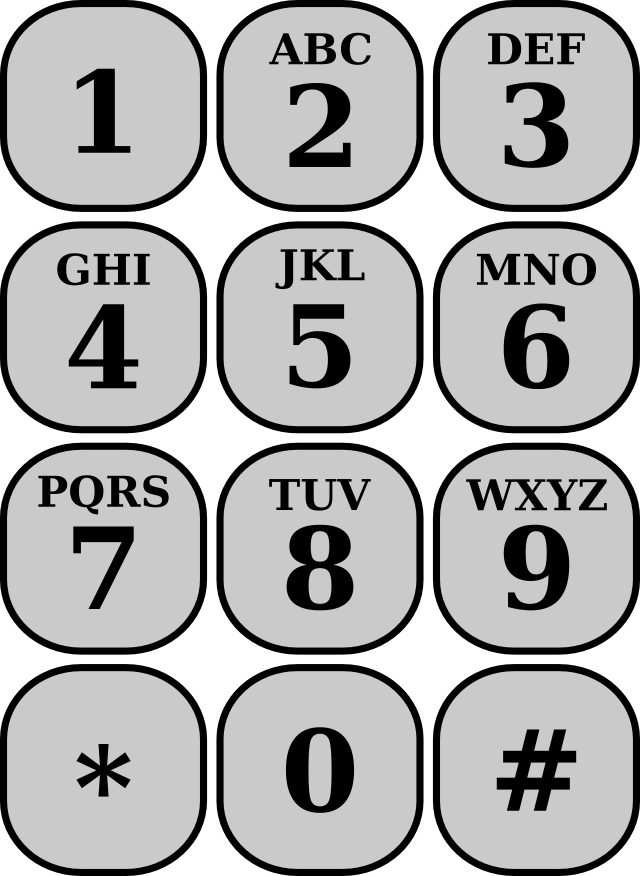
That's pretty clever and is certainly an easy system to use and have a dozen people remember.
And when we have multiple containers in the same room, we use a series of related words so the "theme" further helps you remember them. In our defense, most of us do not have to access them very often, so using a thematic set of words really does help the usability side of the situation.
Quick sidebar... why do we call them combination locks? In mathematics, a combination is a selection of items where order does not matter. The order you enter the numbers of the lock matters very much. If the "combination" is {1, 2, 3}, then you cannot open the lock by entering {3, 2, 1}. When order matters, that's called a permutation. So rightfully, it should be called a permutation lock. End digression.
As discussed in previous posts, there is always a trade-off between security and usability. In this case,
the trade-off sacrifices a significant portion of the number space for the sake of usability convenience.
The combination is no different than a password. We know that you can make passwords stronger by
increasing their length and/or the character space. If you can use digits in addition to letters, you increase the number of character options from 26 to 36 which makes guessing take longer on average due to the larger number of possibilities.
With the safe lock using [00..99], you have 100 numbers to choose from. You cannot use the same 2-digit number twice in the combination, so you you have permutations without repeats. The formula for the total number of permutations of n choose r without repeats is n! / (n - r)!
Using all 100 numbers, the lock has 970,200 different permutations.
But let's look carefully at the telephone pad mapping. There are no letters mapped to the digits 0 or 1.
That eliminates any 2-digit number containing either or both digits. So that eliminates [00..20] and every x0 and x1 up through 90 and 91. After removing all those, we are left with only 64 2-digit numbers. That reduces the number of permutations to 249,984. That just eliminated approximately 75% of the search space.
And it gets worse. Out of all those permutations, how many map back to an English word?
I wrote a Perl program to take the list of words from the "words" 3.0 package on Linux and map them
to their telephone pad numbers. Then I hashed them using the number as the key and looked at the
total number of keys at the end. There are 40562 6-letter words in the file. I'm going to fudge a little
here and not consider short phrases consisting of two smaller words like "GO LONG" and such.
The situation improves a little if you consider those, but there is no easy way to compute how many
such phrases there might be. I also cannot consider local slang, acronyms, abbreviations and in-jokes.
So if you take those 40562 6-letter words and map them to numbers, you find they map to 28420
unique number permutations. That is only 2.9% of the total space of 970,200 permutations.
Let us assume that if you did throw in the other things mentioned above, you might get to say 5% or maybe 10% at best. That is still sacrificing the majority of your the search space by an order of magnitude.
That's pretty clever and is certainly an easy system to use and have a dozen people remember.
And when we have multiple containers in the same room, we use a series of related words so the "theme" further helps you remember them. In our defense, most of us do not have to access them very often, so using a thematic set of words really does help the usability side of the situation.
Quick sidebar... why do we call them combination locks? In mathematics, a combination is a selection of items where order does not matter. The order you enter the numbers of the lock matters very much. If the "combination" is {1, 2, 3}, then you cannot open the lock by entering {3, 2, 1}. When order matters, that's called a permutation. So rightfully, it should be called a permutation lock. End digression.
As discussed in previous posts, there is always a trade-off between security and usability. In this case,
the trade-off sacrifices a significant portion of the number space for the sake of usability convenience.
The combination is no different than a password. We know that you can make passwords stronger by
increasing their length and/or the character space. If you can use digits in addition to letters, you increase the number of character options from 26 to 36 which makes guessing take longer on average due to the larger number of possibilities.
With the safe lock using [00..99], you have 100 numbers to choose from. You cannot use the same 2-digit number twice in the combination, so you you have permutations without repeats. The formula for the total number of permutations of n choose r without repeats is n! / (n - r)!
Using all 100 numbers, the lock has 970,200 different permutations.
But let's look carefully at the telephone pad mapping. There are no letters mapped to the digits 0 or 1.
That eliminates any 2-digit number containing either or both digits. So that eliminates [00..20] and every x0 and x1 up through 90 and 91. After removing all those, we are left with only 64 2-digit numbers. That reduces the number of permutations to 249,984. That just eliminated approximately 75% of the search space.
And it gets worse. Out of all those permutations, how many map back to an English word?
I wrote a Perl program to take the list of words from the "words" 3.0 package on Linux and map them
to their telephone pad numbers. Then I hashed them using the number as the key and looked at the
total number of keys at the end. There are 40562 6-letter words in the file. I'm going to fudge a little
here and not consider short phrases consisting of two smaller words like "GO LONG" and such.
The situation improves a little if you consider those, but there is no easy way to compute how many
such phrases there might be. I also cannot consider local slang, acronyms, abbreviations and in-jokes.
So if you take those 40562 6-letter words and map them to numbers, you find they map to 28420
unique number permutations. That is only 2.9% of the total space of 970,200 permutations.
Let us assume that if you did throw in the other things mentioned above, you might get to say 5% or maybe 10% at best. That is still sacrificing the majority of your the search space by an order of magnitude.
Sunday, December 18, 2016
Security Updates for the Internet of Things
There have been a lot of articles in recent times about the poor security of
internet-connected devices, a.k.a the Internet of Things (IoT).
In earlier times, this just meant routers and wireless access points, but now
it has expanded to include all manner of network-enabled things like security
cameras, toys, appliances, and household automation including light bulbs of
all things. The manufacturers of these devices are adding this capability
because it sells. A lot of people like the cool factor of being able to
control and interact with these devices from their browser or some app.
Or maybe it's a TV or toy that sends data back to a central server.
But what has not gotten the attention it deserves is the fact that each one
of them is now a little computer on the internet and just as reachable as
anything else. With no or poorly implemented security, they can be easy
targets for hackers and prime candidates to be in someone's botnet.
They can spit out DDoS packets or spam just as easily as any other computer.
You could try to address this from either or both sides of the fence.
One might say that the manufacturers should put more thought and effort into
security. But these devices tend to be low-end, commodity items. If the
manufacturer spent the additional resources, the price per device would
have to go up and would quite likely be non-competitive with their peers.
How many consumers are going to pay twice the price because this light bulb
is "more secure"? It's just a light bulb...
The other problem is consumer education. Most people are not computer
enthusiasts, let alone security experts. They just want the cool device
they can control from their tablet or phone. It is unrealistic to expect
that you could convince the majority to become more educated, subscribe to
notices for all these devices and keep up with security upgrades, assuming
those are even made available in the first place (see above).
Some of these devices just work out of the box and do not require any extensive
configuration. So most people are unlikely to go looking for any other settings
like security, assuming they're even there to begin with. And if they are, it
may have a poorly designed and hard to use interface. And even for the person
who is aware and wants to secure them, does the manufacturer make any updates
available? Back to the first side of the problem again.
Given this natural and understandable lack of interest, also consider that
as long as the devices are working as expected, their botnet participation
may likely go completely unnoticed. With a broadband internet connection,
would you notice an extra stream of packets coming out of these things?
Again, not likely unless it took up so much that it hampered your streaming
movie or online gaming and finally caused you to investigate. A smart botnet
operator would consider this and not abuse the "privilege" so to speak.
With the high cost to address this from either or both sides of the manufacturer/consumer
line and the lack of consequences to either one of them if a "responsible" hacker takes
control, it is no wonder this is happening and we're all left asking what to do?
internet-connected devices, a.k.a the Internet of Things (IoT).
In earlier times, this just meant routers and wireless access points, but now
it has expanded to include all manner of network-enabled things like security
cameras, toys, appliances, and household automation including light bulbs of
all things. The manufacturers of these devices are adding this capability
because it sells. A lot of people like the cool factor of being able to
control and interact with these devices from their browser or some app.
Or maybe it's a TV or toy that sends data back to a central server.
But what has not gotten the attention it deserves is the fact that each one
of them is now a little computer on the internet and just as reachable as
anything else. With no or poorly implemented security, they can be easy
targets for hackers and prime candidates to be in someone's botnet.
They can spit out DDoS packets or spam just as easily as any other computer.
You could try to address this from either or both sides of the fence.
One might say that the manufacturers should put more thought and effort into
security. But these devices tend to be low-end, commodity items. If the
manufacturer spent the additional resources, the price per device would
have to go up and would quite likely be non-competitive with their peers.
How many consumers are going to pay twice the price because this light bulb
is "more secure"? It's just a light bulb...
The other problem is consumer education. Most people are not computer
enthusiasts, let alone security experts. They just want the cool device
they can control from their tablet or phone. It is unrealistic to expect
that you could convince the majority to become more educated, subscribe to
notices for all these devices and keep up with security upgrades, assuming
those are even made available in the first place (see above).
Some of these devices just work out of the box and do not require any extensive
configuration. So most people are unlikely to go looking for any other settings
like security, assuming they're even there to begin with. And if they are, it
may have a poorly designed and hard to use interface. And even for the person
who is aware and wants to secure them, does the manufacturer make any updates
available? Back to the first side of the problem again.
Given this natural and understandable lack of interest, also consider that
as long as the devices are working as expected, their botnet participation
may likely go completely unnoticed. With a broadband internet connection,
would you notice an extra stream of packets coming out of these things?
Again, not likely unless it took up so much that it hampered your streaming
movie or online gaming and finally caused you to investigate. A smart botnet
operator would consider this and not abuse the "privilege" so to speak.
With the high cost to address this from either or both sides of the manufacturer/consumer
line and the lack of consequences to either one of them if a "responsible" hacker takes
control, it is no wonder this is happening and we're all left asking what to do?
Friday, October 14, 2016
It's that time again
It's been three years, so the Security+ ce is up for renewal again.
Just like last time, I got 40 of 50 credits from training activity and will fulfill the rest with relevant blog posts here. This turned out to be really simple and kind of fun too.
Just like last time, I got 40 of 50 credits from training activity and will fulfill the rest with relevant blog posts here. This turned out to be really simple and kind of fun too.
Friday, January 24, 2014
Credit Card Authentication
As news continues to trickle out about the Target breach (and allegedly 6 other merchants, including Neiman Marcus), I continue to wonder why the credit card companies have not taken steps to provide more security at the point of purchase. Perhaps their cost of dealing with compromised cards is less than the cost of rolling out a whole new mechanism that would likely involve new cards, new POS terminals, training everyone involved, etc? Personally, I am hoping that the magnitude of these most recent incidents will serve as leverage to make such changes.
Regardless of why it has not been done, I wanted to understand more about the current security mechanisms. When I make a credit card purchase in person, I swipe my card in the POS terminal and then possibly sign the transaction receipt (either on paper or digitally on the POS terminal screen, if it has one). That's it. Rarely am I asked to present a photo ID. And in the last few years, some merchants have stopped requiring the receipt signature if the purchase total is less than some amount. The amount seems to vary, but the limit is typically between $25 and $40. Also consider purchases made at automated kiosks including most gas pumps, where you do not have to sign at all.
So if someone could steal my card (or clone it using information stolen electronically), they would likely be able to make purchases with it. Especially if they know which stores typically do not ask for additional proof of identification and/or make small purchases and do not get greedy with it. The mechanisms of photo ID and receipt signature are pretty weak. The probability of the clerk knowing you personally is very small. And the clerk is unlikely to have been professionally trained at spotting fake IDs or handwriting analysis. So comparing the signature on the credit card with the receipt and/or ID is not going to get a lot of scrutiny. Also, the merchant will err on the side of making profit and permit most purchases by default. A merchants public image would be damaged if they became know for turning down valid transactions (i.e. false positives). And the merchant is not liable for the fraud. Neither are you. Federal law limits your liability to $50 and that is typically waived by the major credit card vendors.
Even if these mechanisms were not so weak, is the merchant required to implement them? The answer varies with card type and the policies have changed over time. An internet search turns up several articles exploring this same question, but they are all several years old with outdated or broken links to the credit card merchant sites. So I did a fresh search as of January 2014.
All of the big four vendors require the signature check for in-person purchases, but what about requesting photo ID?
Visa (page 431) says no.
Mastercard (page 3-2, #7) says yes.
American Express (page 22, section 4.4) says no.
I could not locate the Discover manual, only a fraud FAQ.
It looks like you may need to be a registered merchant to access their documents.
the FAQ suggests that refusal of showing photo ID is "suspicious", but does not mention any policy of asking to see it.
I don't have a Mastercard, but have used some of the others and can count on my two hands how many times in over twenty years that I've been asked to show my photo ID.
There is an interesting meme floating around that says you can "sign" your credit card with the statement "See ID". The idea is that the merchant would then be forced to ask for your photo ID. This has been debunked. Not using your actual signature means the card is technically invalid. This may actually work for you if the clerk agrees with the meme, but it has no legal validity.
What about the PIN or the CVV2 code on the back of the card? Yes, credit cards have a PIN. When you first got your card, there was a separate envelope mailed to you from a different, seemingly unrelated address that contained the PIN. So why are we not using that like we do for debit card transactions? The only place it is required is if you use your credit card at an ATM to get a cash advance (i.e. high-interest loan).
The CVV2 code on the back is not required for in-person purchases, but is used by a few merchants. At Best Buy, for example, they usually ask to see my card, flip it over and type the code into the cash register. So that makes it more like an online purchase where it is often (but not always) required. Of course, this does not matter if someone has acquired your physical card. Then they have that number too.
In my opinion, it is only a matter of time now before we see some new payment processing infrastructure rolled out en masse. It will likely be EMV (chip and PIN), i.e. smart cards that can do some cryptographic calculations all by themselves. Powered by the POS terminal, they would be given transaction session information and only emit encrypted packets back through the merchant's system to the payment processor. This is analogous to the Secure Shell protocol where public/private keys are used to securely exchange the session key and all traffic is encrypted the entire time. And in order for a thief to clone your card, they would need to compromise all the way into the card itself to extract your keys. If they steal your physical card, then they have to crack your PIN and these cards can be configured to lock themselves down after so many incorrect attempts. I have no doubt that someone can engineer a way around all that, but at what expense? Just like the merchants and credit card vendors, the thieves also have to balance the cost vs reward ratio. If it costs them more time and effort than they get out of it, then it is not worth the time to crack your card. These guys are just as business savvy as anyone else, they just choose to do things that are considered illegal.
This post maps to CompTIA SY0-301 exam objectives 2.1 and 5.2.
Regardless of why it has not been done, I wanted to understand more about the current security mechanisms. When I make a credit card purchase in person, I swipe my card in the POS terminal and then possibly sign the transaction receipt (either on paper or digitally on the POS terminal screen, if it has one). That's it. Rarely am I asked to present a photo ID. And in the last few years, some merchants have stopped requiring the receipt signature if the purchase total is less than some amount. The amount seems to vary, but the limit is typically between $25 and $40. Also consider purchases made at automated kiosks including most gas pumps, where you do not have to sign at all.
So if someone could steal my card (or clone it using information stolen electronically), they would likely be able to make purchases with it. Especially if they know which stores typically do not ask for additional proof of identification and/or make small purchases and do not get greedy with it. The mechanisms of photo ID and receipt signature are pretty weak. The probability of the clerk knowing you personally is very small. And the clerk is unlikely to have been professionally trained at spotting fake IDs or handwriting analysis. So comparing the signature on the credit card with the receipt and/or ID is not going to get a lot of scrutiny. Also, the merchant will err on the side of making profit and permit most purchases by default. A merchants public image would be damaged if they became know for turning down valid transactions (i.e. false positives). And the merchant is not liable for the fraud. Neither are you. Federal law limits your liability to $50 and that is typically waived by the major credit card vendors.
Even if these mechanisms were not so weak, is the merchant required to implement them? The answer varies with card type and the policies have changed over time. An internet search turns up several articles exploring this same question, but they are all several years old with outdated or broken links to the credit card merchant sites. So I did a fresh search as of January 2014.
All of the big four vendors require the signature check for in-person purchases, but what about requesting photo ID?
Visa (page 431) says no.
Mastercard (page 3-2, #7) says yes.
American Express (page 22, section 4.4) says no.
I could not locate the Discover manual, only a fraud FAQ.
It looks like you may need to be a registered merchant to access their documents.
the FAQ suggests that refusal of showing photo ID is "suspicious", but does not mention any policy of asking to see it.
I don't have a Mastercard, but have used some of the others and can count on my two hands how many times in over twenty years that I've been asked to show my photo ID.
There is an interesting meme floating around that says you can "sign" your credit card with the statement "See ID". The idea is that the merchant would then be forced to ask for your photo ID. This has been debunked. Not using your actual signature means the card is technically invalid. This may actually work for you if the clerk agrees with the meme, but it has no legal validity.
What about the PIN or the CVV2 code on the back of the card? Yes, credit cards have a PIN. When you first got your card, there was a separate envelope mailed to you from a different, seemingly unrelated address that contained the PIN. So why are we not using that like we do for debit card transactions? The only place it is required is if you use your credit card at an ATM to get a cash advance (i.e. high-interest loan).
The CVV2 code on the back is not required for in-person purchases, but is used by a few merchants. At Best Buy, for example, they usually ask to see my card, flip it over and type the code into the cash register. So that makes it more like an online purchase where it is often (but not always) required. Of course, this does not matter if someone has acquired your physical card. Then they have that number too.
In my opinion, it is only a matter of time now before we see some new payment processing infrastructure rolled out en masse. It will likely be EMV (chip and PIN), i.e. smart cards that can do some cryptographic calculations all by themselves. Powered by the POS terminal, they would be given transaction session information and only emit encrypted packets back through the merchant's system to the payment processor. This is analogous to the Secure Shell protocol where public/private keys are used to securely exchange the session key and all traffic is encrypted the entire time. And in order for a thief to clone your card, they would need to compromise all the way into the card itself to extract your keys. If they steal your physical card, then they have to crack your PIN and these cards can be configured to lock themselves down after so many incorrect attempts. I have no doubt that someone can engineer a way around all that, but at what expense? Just like the merchants and credit card vendors, the thieves also have to balance the cost vs reward ratio. If it costs them more time and effort than they get out of it, then it is not worth the time to crack your card. These guys are just as business savvy as anyone else, they just choose to do things that are considered illegal.
This post maps to CompTIA SY0-301 exam objectives 2.1 and 5.2.
Sunday, January 19, 2014
Content Filtering and Analysis
I work in a "high-security" facility and we have all manner of policies and rules to follow to be considered worthy of a simple Internet connection at our workstations. Our facility is just one building on a much larger campus and all the network traffic to the outside world goes through a single gateway. As part of their security apparatus, they have set up an HTTPS proxy at this gateway. The proxy allows them to break open every HTTPS connection with a deliberate man-in-the-middle (MITM) "attack" for the purpose of analyzing it to make sure it's "OK" by their definition. On top of this, they also subscribe to a content analysis/filter service that categorizes various sites and pigeon-holes them into one or more labels. Then certain labeled categories are denied as a whole.
Both of these mechanism introduce some rather severe usability issues. In several previous posts on this blog, I have brought up the subject of usability. In my experience, usability is about the last thing that security folks consider. It really ought to be part of the availability side of the security triangle. If something becomes too difficult or impossible to use, but it is a legitimate need, then it has become unavailable. Then users are tempted to seek workarounds or "other means" of getting to their resources. Security FAIL.
Let's look at some specific issues.
The MITM HTTPS proxy wreaks all kinds of havoc. It causes a noticeable increase in download speed for the extra time it takes to establish a second HTTPS connection with whomever you actually intended to reach. Remember this one system is doing this for every connection on the entire campus which is several tens of thousands of systems. I sometimes download software via svn or git servers. Wireshark is a good example. This is a fairly lengthy operation, much larger than a typical single web page. It often breaks down in mid-download for no apparent reason. If I download it from outside the facility (e.g. at home) it works fine every time.
The content analysis/filter frequently prevents access to legitimate resources for the wrong reasons. The facility subscribes to a third-party filter service. They just get a regular filter definition update and install it. Job done as far as they're concerned. Unfortunately, the granularity of the filter is pretty big and lots of sites get lumped into a general category of "bad" with no further distinction made. A great example is a site being declared a "blogging site". That is way too broad. We are doing software engineering and solving a lot of technical problems about Linux, C++, etc. Many times, a web search will turn up someone talking about the exact, specific issue that we are having, but... the discussion is on a "blog" site (<gasp>). So you end up emailing the URL to yourself at home and looking it up from there later. Progress is delayed. Part of our application makes use of OpenGL doing all kinds of fancy graphics stuff. A lot of discussion about those types of issues is found on gaming development forums, but they're all blocked because they are lumped into the "gaming site" category. Shame on you, programmer, for looking at gaming sites instead of working!
I have also encountered sites that are blocked for seemingly no logical reason. A good example is http://libssh.org. When I got denied access to that one day, I decided to try challenging it and requesting an exception. I explained what it was, why I wanted access and how it was not in any way qualified to be in the "known spammers" category. After escalating it to the "tier 2" guy, I was told that yes, that site was OK, but unfortunately the IP of its hosting service was in a range of addresses that host known spammers. So the entire range of addresses was just blocked wholesale. And since they just subscribe to this third-party list and it had the range listed, they could not or would not make any change for it. So once again, I download it at home later.
So how could this situation be improved? If I were in charge of the whole thing, I would have a few folks appointed to be the local point of good judgement and discretion. They would be tasked with evaluating all requests for exceptions and making local tweaks to the content filter definition. I think a subscription-based service is fine as the starting point, but if you just accept that as-is, you will end up hurting the usability for your particular, local users. And that reduces availability which can hurt security more than it helps sometimes.
This post maps to CompTIA SY0-301 exam objectives 1.1 and 2.8.
Both of these mechanism introduce some rather severe usability issues. In several previous posts on this blog, I have brought up the subject of usability. In my experience, usability is about the last thing that security folks consider. It really ought to be part of the availability side of the security triangle. If something becomes too difficult or impossible to use, but it is a legitimate need, then it has become unavailable. Then users are tempted to seek workarounds or "other means" of getting to their resources. Security FAIL.
Let's look at some specific issues.
The MITM HTTPS proxy wreaks all kinds of havoc. It causes a noticeable increase in download speed for the extra time it takes to establish a second HTTPS connection with whomever you actually intended to reach. Remember this one system is doing this for every connection on the entire campus which is several tens of thousands of systems. I sometimes download software via svn or git servers. Wireshark is a good example. This is a fairly lengthy operation, much larger than a typical single web page. It often breaks down in mid-download for no apparent reason. If I download it from outside the facility (e.g. at home) it works fine every time.
The content analysis/filter frequently prevents access to legitimate resources for the wrong reasons. The facility subscribes to a third-party filter service. They just get a regular filter definition update and install it. Job done as far as they're concerned. Unfortunately, the granularity of the filter is pretty big and lots of sites get lumped into a general category of "bad" with no further distinction made. A great example is a site being declared a "blogging site". That is way too broad. We are doing software engineering and solving a lot of technical problems about Linux, C++, etc. Many times, a web search will turn up someone talking about the exact, specific issue that we are having, but... the discussion is on a "blog" site (<gasp>). So you end up emailing the URL to yourself at home and looking it up from there later. Progress is delayed. Part of our application makes use of OpenGL doing all kinds of fancy graphics stuff. A lot of discussion about those types of issues is found on gaming development forums, but they're all blocked because they are lumped into the "gaming site" category. Shame on you, programmer, for looking at gaming sites instead of working!
I have also encountered sites that are blocked for seemingly no logical reason. A good example is http://libssh.org. When I got denied access to that one day, I decided to try challenging it and requesting an exception. I explained what it was, why I wanted access and how it was not in any way qualified to be in the "known spammers" category. After escalating it to the "tier 2" guy, I was told that yes, that site was OK, but unfortunately the IP of its hosting service was in a range of addresses that host known spammers. So the entire range of addresses was just blocked wholesale. And since they just subscribe to this third-party list and it had the range listed, they could not or would not make any change for it. So once again, I download it at home later.
So how could this situation be improved? If I were in charge of the whole thing, I would have a few folks appointed to be the local point of good judgement and discretion. They would be tasked with evaluating all requests for exceptions and making local tweaks to the content filter definition. I think a subscription-based service is fine as the starting point, but if you just accept that as-is, you will end up hurting the usability for your particular, local users. And that reduces availability which can hurt security more than it helps sometimes.
This post maps to CompTIA SY0-301 exam objectives 1.1 and 2.8.
Saturday, January 18, 2014
Public key authentication with libssh
Continuing my previous post about libssh, the next question was how to handle authentication.
The library (version 0.6.0) allows for several methods, including passwords, public keys, keyboard interactive and GSSAPI. For my use case, I knew passwords were right out because once the shared key was passed around, it would be worthless with no way to control access. I didn't like the sound of keyboard interactive and don't know a thing about GSSAPI. I've been using public key authentication with ssh for many years, so that seemed like a good choice.
Once a session has been established and keys exchanged, you are ready to accept the authentication.
Set your public key authorization callback in the server callbacks struct.
In my use case, there is no relevant username because we're not logging into a system. So I just ignore that value. It can even be omitted on the client side. I chose to simply have a directory within my application's data area that is the designated location for authorized public keys. This is equivalent to the authorized_keys2 file. There is little difference between keeping them all in one file or having separate files in one directory. So my auth_pubkey function logic looks like this (error-checking elided for clarity).
if ( signature_state == SSH_PUBLICKEY_STATE_NONE )
return SSH_AUTH_PARTIAL;
if ( signature_state != SSH_PUBLICKEY_STATE_VALID )
return SSH_AUTH_DENIED;
// valid signature received
// loop through the keys directory, for each key file 'f'
ssh_key k;
ssh_pki_import_pubkey_file( f, &k );
int result = ssh_key_cmp( k, pubkey, SSH_KEY_CMP_PUBLIC );
ssh_key_free(k);
if ( result == 0 )
authenticated = true; // to exit the event polling loop
return SSH_AUTH_SUCCESS;
// if no matches
return SSH_AUTH_DENIED;
This works but leaves me with one open question. Why does it get called twice? Once with a signature state of NONE and then again with VALID after the client has given the private key passphrase. In fact, if you don't return PARTIAL in response to NONE, then the client side never prompts for the passphrase at all. With this logic, the client side (at least OpenSSH) shows an extra line of verbose output stating "Authenticated with partial success". That's harmless but I will continue to investigate and see if I can clean that up.
Note that there are two mechanisms at work here to denote that authentication is complete. You return SUCCESS/PARTIAL/DENIED for the sake of the library logic that is taking care of so many things for you. You also set the 'authenticated' boolean to true to break out of the application-managed event loop. Are these two controls redundant? Not at all. Suppose you wanted to be extra secure and use multiple authentication mechanisms. They all get processed off this one loop with all the respective method callbacks firing. Each one of them is telling the library if that particular method is successful or not. Then you still need something like the authenticated boolean to reflect your application's overall success state, i.e. once all the methods have succeeded.
It does not get much easier than this. Many thanks to the authors of libssh for encapsulating so much of the work.
This post maps to CompTIA SY0-301 exam objective 1.4.
The library (version 0.6.0) allows for several methods, including passwords, public keys, keyboard interactive and GSSAPI. For my use case, I knew passwords were right out because once the shared key was passed around, it would be worthless with no way to control access. I didn't like the sound of keyboard interactive and don't know a thing about GSSAPI. I've been using public key authentication with ssh for many years, so that seemed like a good choice.
Once a session has been established and keys exchanged, you are ready to accept the authentication.
Set your public key authorization callback in the server callbacks struct.
struct ssh_server_callbacks_struct cb = {Tell it that you only want public key authentication. It will automatically deny all attempts to use passwords and other methods for you.
.auth_pubkey_function = auth_pubkey
};
ssh_set_auth_methods(session,SSH_AUTH_METHOD_PUBLICKEY);Create the event loop that will take care of all the I/O for you and simply invoke your authentication callback at the appropriate time to let you decide what the answer will be.
mainloop = ssh_event_new();The public key authentication callback looks like this. You are given a pointer to the session, any username that was used, a pointer to the public key that was offered, the key's signature state and your own application user data (if any).
ssh_event_add_session(mainloop, session);
while (!(authenticated && chan != NULL)){
if(error)
break;
r = ssh_event_dopoll(mainloop, -1);
}
int auth_pubkey( ssh_session session,So what do we do with all this? I had a brief moment of initial confusion about being handed a public key instead of a private key. Well duh, you don't ever send the private key anywhere or it would not remain private for long, would it? Referring to RFC 4252 - The Secure Shell (SSH) Authentication Protocol, section 7, we see what's going on. Back on the client side, the SSH client uses your private key to sign a copy of your public key. Then the public key and signature get sent to the server and show up in this callback. Actually, the library has already evaluated the validity of the signature and simply gives you the signature_state enumerated value. You need the whole public key, however, because you're likely going to compare that to one or more public keys already installed on the server side to see if this one is a match. Using OpenSSH, for example, you would have your public key installed on the server side in the $HOME/.ssh/authorized_keys2 file. The server sees you attempting a login as user 'fred' and compares the public key offered from the client side to all the keys in user fred's authorized_keys2 file. If the signature is valid and there is a match, you're in. If not, then you are rejected.
const char *user,
struct ssh_key_struct *pubkey,
char signature_state,
void *userdata );
In my use case, there is no relevant username because we're not logging into a system. So I just ignore that value. It can even be omitted on the client side. I chose to simply have a directory within my application's data area that is the designated location for authorized public keys. This is equivalent to the authorized_keys2 file. There is little difference between keeping them all in one file or having separate files in one directory. So my auth_pubkey function logic looks like this (error-checking elided for clarity).
if ( signature_state == SSH_PUBLICKEY_STATE_NONE )
return SSH_AUTH_PARTIAL;
if ( signature_state != SSH_PUBLICKEY_STATE_VALID )
return SSH_AUTH_DENIED;
// valid signature received
// loop through the keys directory, for each key file 'f'
ssh_key k;
ssh_pki_import_pubkey_file( f, &k );
int result = ssh_key_cmp( k, pubkey, SSH_KEY_CMP_PUBLIC );
ssh_key_free(k);
if ( result == 0 )
authenticated = true; // to exit the event polling loop
return SSH_AUTH_SUCCESS;
// if no matches
return SSH_AUTH_DENIED;
This works but leaves me with one open question. Why does it get called twice? Once with a signature state of NONE and then again with VALID after the client has given the private key passphrase. In fact, if you don't return PARTIAL in response to NONE, then the client side never prompts for the passphrase at all. With this logic, the client side (at least OpenSSH) shows an extra line of verbose output stating "Authenticated with partial success". That's harmless but I will continue to investigate and see if I can clean that up.
Note that there are two mechanisms at work here to denote that authentication is complete. You return SUCCESS/PARTIAL/DENIED for the sake of the library logic that is taking care of so many things for you. You also set the 'authenticated' boolean to true to break out of the application-managed event loop. Are these two controls redundant? Not at all. Suppose you wanted to be extra secure and use multiple authentication mechanisms. They all get processed off this one loop with all the respective method callbacks firing. Each one of them is telling the library if that particular method is successful or not. Then you still need something like the authenticated boolean to reflect your application's overall success state, i.e. once all the methods have succeeded.
It does not get much easier than this. Many thanks to the authors of libssh for encapsulating so much of the work.
This post maps to CompTIA SY0-301 exam objective 1.4.
Thursday, January 2, 2014
Embedding SSH Service
Some network appliances (routers, firewalls, etc) support a remote command-line interface. This can be a good way to provide a user interface to a device that doesn't have video and isn't connected to any peripheral. It's just there on the network. Traditionally, this interface uses the TELNET protocol. The origin of this feature predates SSH and HTTP. Most newer items tend to use an HTTP-based interface where you just point your web browser to it. Some devices may have SSH instead or in addition to the TELNET option for better security.
I work with a proprietary application that runs like a system service and has no user interface. However, there are a number of performance-related parameters and status values that are useful to inspect and possibly modify at run-time to perform diagnostics or help create particular test conditions. In this applications environment, low-security interfaces are, shall we say, frowned upon. And we did not have the resources to implement a full-blown HTML interface using HTTPS or anything like that. So recalling the simple TELNET command-line interfaces that some devices use, I thought that would make a good option.
The first version made use of a very handy library called Libcli created by David Parrish. This library is easily included with your application and takes care of setting up the socket and handling the whole TELNET part. You register as many different commands as you want, each mapping to a callback function that you provide. The library takes care of parsing the user input and invoking the registered callback. From the callback you can do whatever you want and print output that goes back to the client side for display.
That was great until the security folks said, "hey, you can't run a TELNET service". They were not willing to draw a distinction between a TELNET service allowing a user login to the system and an application allowing access to some diagnostic information. Their network scanner just saw "something" respond positively to a TELNET request. Compliance check failed. End of story.
So we had to disable it in deployed configurations and can only use it in the test lab. So my next logical thought was using SSH instead of TELNET for the authentication and transport but still let Libcli handle all the command processing after that. I didn't want to have to reverse-engineer the OpenSSH code to pull out what I needed. Had anyone written a library that made implementing the SSH protocol simple for embedding in other applications? Of course they have. I'm not the first person to think of any of this.
I found two obvious candidates, libssh and libssh2. So which one should I try first? The libssh2 folks already did my homework for me with this comparison chart of their library vs libssh. This made the decision very quick because libssh2 does not have server-side functionality, where libssh does. Done.
libssh takes care of almost every necessary SSH function for you. It sets up the socket, listens for connections, handles authentication (using host keys you provide), lets you set up a pty and open a secure channel. After that, you have a secure "pipe" to read/write data, whatever that data might be. That part is your business.
So the next question was how to meld the two libraries together? I wanted to use libssh to do all the SSH part but still let Libcli handle all the command processing over the secure channel. In order to read/write the secure channel you use the ssh_channel_read() and ssh_channel_write() functions. Other than the channel parameter, you just give them a pointer to your buffer and length and its just like a plain read()/write() as far as you're concerned. Now in Libcli, once you set up all your commands, you normally just call the cli_loop() function. But in this use-case, we cannot do that because cli_loop() encapsulates too much stuff we don't want. It handles accepting socket connections, all the TELNET stuff and then executing the appropriate callback function. We just need to parse the command and invoke the callback. Most of that is encapsulated in cli_run_command().
So that just leaves our code with the duty of processing the raw user input from the secure channel and assembling a line (until 'enter') and passing it to cli_run_command(). But how will output from the callback functions get back to the client side? All output from Libcli callback functions is done by calling cli_print(). Since that's part of the library, it has direct access to the file descriptor of the socket and sends your output back to the client for you. But in our case, we have to call ssh_channel_write(). Fortunately, Libcli has foreseen this type of situation and provided cli_print_callback() which, if set, will be invoked from cli_print() instead of trying to write to the internal file descriptor (which is NULL because we didn't use cli_loop() to accept a connection). So the command callback invokes the print function which calls my callback with the output text. Perfect. My print callback just passes the buffer on to ssh_channel_write().
So that's it in a nutshell. As my initial proof-of-concept demonstration, I simply modified one of the examples provided with libssh. Note that this uses the release candidate version 0.6.0 of libssh. The current stable release (0.5.5) does not have as many examples of SSH server code.
sshcli.c
A single, trivial command of "show stuff" is set up with Libcli and then the rest of the modification is in the do loop that reads from the channel. To build it, just compile with gcc and link with both Libcli and libssh.
This post maps to CompTIA SY0-301 exam objective 1.4.
I work with a proprietary application that runs like a system service and has no user interface. However, there are a number of performance-related parameters and status values that are useful to inspect and possibly modify at run-time to perform diagnostics or help create particular test conditions. In this applications environment, low-security interfaces are, shall we say, frowned upon. And we did not have the resources to implement a full-blown HTML interface using HTTPS or anything like that. So recalling the simple TELNET command-line interfaces that some devices use, I thought that would make a good option.
The first version made use of a very handy library called Libcli created by David Parrish. This library is easily included with your application and takes care of setting up the socket and handling the whole TELNET part. You register as many different commands as you want, each mapping to a callback function that you provide. The library takes care of parsing the user input and invoking the registered callback. From the callback you can do whatever you want and print output that goes back to the client side for display.
That was great until the security folks said, "hey, you can't run a TELNET service". They were not willing to draw a distinction between a TELNET service allowing a user login to the system and an application allowing access to some diagnostic information. Their network scanner just saw "something" respond positively to a TELNET request. Compliance check failed. End of story.
So we had to disable it in deployed configurations and can only use it in the test lab. So my next logical thought was using SSH instead of TELNET for the authentication and transport but still let Libcli handle all the command processing after that. I didn't want to have to reverse-engineer the OpenSSH code to pull out what I needed. Had anyone written a library that made implementing the SSH protocol simple for embedding in other applications? Of course they have. I'm not the first person to think of any of this.
I found two obvious candidates, libssh and libssh2. So which one should I try first? The libssh2 folks already did my homework for me with this comparison chart of their library vs libssh. This made the decision very quick because libssh2 does not have server-side functionality, where libssh does. Done.
libssh takes care of almost every necessary SSH function for you. It sets up the socket, listens for connections, handles authentication (using host keys you provide), lets you set up a pty and open a secure channel. After that, you have a secure "pipe" to read/write data, whatever that data might be. That part is your business.
So the next question was how to meld the two libraries together? I wanted to use libssh to do all the SSH part but still let Libcli handle all the command processing over the secure channel. In order to read/write the secure channel you use the ssh_channel_read() and ssh_channel_write() functions. Other than the channel parameter, you just give them a pointer to your buffer and length and its just like a plain read()/write() as far as you're concerned. Now in Libcli, once you set up all your commands, you normally just call the cli_loop() function. But in this use-case, we cannot do that because cli_loop() encapsulates too much stuff we don't want. It handles accepting socket connections, all the TELNET stuff and then executing the appropriate callback function. We just need to parse the command and invoke the callback. Most of that is encapsulated in cli_run_command().
So that just leaves our code with the duty of processing the raw user input from the secure channel and assembling a line (until 'enter') and passing it to cli_run_command(). But how will output from the callback functions get back to the client side? All output from Libcli callback functions is done by calling cli_print(). Since that's part of the library, it has direct access to the file descriptor of the socket and sends your output back to the client for you. But in our case, we have to call ssh_channel_write(). Fortunately, Libcli has foreseen this type of situation and provided cli_print_callback() which, if set, will be invoked from cli_print() instead of trying to write to the internal file descriptor (which is NULL because we didn't use cli_loop() to accept a connection). So the command callback invokes the print function which calls my callback with the output text. Perfect. My print callback just passes the buffer on to ssh_channel_write().
So that's it in a nutshell. As my initial proof-of-concept demonstration, I simply modified one of the examples provided with libssh. Note that this uses the release candidate version 0.6.0 of libssh. The current stable release (0.5.5) does not have as many examples of SSH server code.
sshcli.c
A single, trivial command of "show stuff" is set up with Libcli and then the rest of the modification is in the do loop that reads from the channel. To build it, just compile with gcc and link with both Libcli and libssh.
gcc sshcli.c -o sshcli -lcli -lsshTo run it, you'll need to provide SSH host keys. I just copied the ones on my system. Also specify which port to listen on. The default port 22 is taken by your system's sshd service, of course. Your application will be listening on something else.
sshcli -d host_dsa_key -r host_rsa_key -p 2000 127.0.0.1Then from another shell, just connect with ssh. The example program uses password authentication with username "user" and password "password".
ssh -p 2000 user@127.0.0.1After authenticating, you'll get the welcome banner and the prompt. Note that I had to implement those too because they are normally taken care of by cli_loop(). Then start typing commands. Done.
This post maps to CompTIA SY0-301 exam objective 1.4.
Sunday, December 29, 2013
Payment Card Security
The recent breach of payment card data from US Target stores piqued my curiosity about exactly how credit and debit card security works. Many of us use these cards nearly every day if not several times per day to pay for goods and services both in person and online. Yet how many people understand the security of these instruments that permit access to our financial resources?
There are two basic types of payment cards, credit and debit. Both of them serve as your identification and means of authentication for authorizing a transaction between you and a merchant. The cards all conform to the ISO/IEC 7813 standard. For identification, they have your name and account number both printed and encoded on the magnetic stripe. There are several mechanisms that provide authentication. Which one(s) gets used depends on which type of card it is and how you are using it. You can use the cards in person at a point-of-sale (POS) terminal or you can make an online/telephone/mail-order (i.e. "card not present") transaction.
If you are physically at the merchant's checkout register, the card is "what you have". If it is a debit card, then the PIN is "what you know" and you have two-factor authentication. If it is a credit card, the merchant should verify your identity against a government-issued photo ID (e.g. driver's license) and also compare the signature on your credit card to the one on your receipt or the digital signing pad. I think of this as a crude quasi-biometric that weakly qualifies as "what you are". (That's probably another post to rip that idea apart.) So in practice, credit cards are effectively one-factor authentication.
Interestingly, most credit cards have a PIN number too, but that's only used for ATM cash advances. I think most people use a debit card at the ATM, so it's kind of useless. You'd think they would have required that at POS terminals for two-factor authentication, yes? Credit cards have been around far longer than debit cards. I suspect the PIN came later and now it's too expensive to mandate an update to the entire infrastructure (e.g. IPv6 upgrade). Also, federal law limits your fraud liability to $50 and the big companies (Visa, etc) waive that to $0. I'm guessing with their massive resources, it's cheaper to take the chance and maintain good relations with the customers, i.e. a calculated risk.
If you are making a "card not present" purchase, then a merchant should require you to provide the CVV2 code (the 3 or 4 digit code on the back of the card). This code can be used in the transaction with the payment processor to verify that the card number given is legitimate. This replaces the use of the CVV1 code which is only encoded on the magnetic stripe which is not used in this case. Since all the data provided is on the card, this is one-factor authentication. Some merchants still do not require the CVV2 code. I guess they're just passing the buck to financial institution if the transaction turns out to be fraudulent.
No matter which type of card and transaction you're doing, the steps are fundamentally the same. You provide the card (or its data) to the merchant. They communicate this data along with the proposed amount of the transaction to their payment processor for authorization. Most of the card-issuing institutions do not deal with this directly, but farm it out to third parties who have the ability to authorize the transaction to occur between the merchant and your account. There are many institutions, processors and merchants that all have to work together seamlessly in order to provide you with a consistent purchasing mechanism. In regards to security, the Payment Card Industry (PCI) Security Standards Council formed in 2006 to provide security requirements and best practices for all these participants. They offer the Data Security Standard (version 3.0 as of Nov 2013) that provides a framework of security requirements, testing procedures and implementation guidance for all aspects of payment card processing.
We don't have any technical details from the Target breach (and we probably won't), but we can learn a few things from their public relations handling. They have a web page dedicated to the issue including an FAQ. According to the FAQ, they found some type of malware on their point-of-sale systems. I take that to mean the actual swipe terminals or the interface between them and the payment processor. There was some initial confusion about "CVV information" being acquired. This is a terminology nightmare. Read something like this Wikipedia entry and then tell me what they're talking about. I believe what was acquired was the CVV1 code which is on the magnetic stripe. The CVV2 code is not on the stripe, only physically printed on the back of the card. There is no way to capture that electronically (unless you want to talk about cameras planted under the POS terminal). The CVV1 code cannot be used for fraudulent online purchases, but it can be used to reconstruct a clone of your card for fraudulent in-person purchases.
There was also concern over captured PIN data from debit cards. Target later confirmed that the encrypted PIN data was also acquired. Your PIN gets encrypted right in the keypad terminal and has to be transmitted to the payment processor. Also PCI DSS requirement 3.2.3 says that PIN data (encrypted or not) should never be stored. In fact, there is an entire separate document all about PIN Security Requirements. However, it has to reside in some memory buffer long enough to get transmitted from the POS terminal to the processor. That's probably where it got captured. The data is encrypted with Triple-DES which was the precursor recommendation for "strong encryption" before AES was published. The Target FAQ says that the decryption key is only possessed by the payment processor and has never been on any Target system ever. This implies PKI and Target only has the payment processor's public key. So this is as well protected as anything encrypted with Triple-DES. Unless the NSA was behind this, I doubt the thieves can do much with that. Nor do they need to because you can opt to use a debit card but pay as a credit transaction which does not require PIN entry.
And now we're back to my earlier question about why credit cards do not require PIN use. How many more large-scale incidents like this will it take before we bite the bullet and introduce credit card PINs? Perhaps we use the European-style "chip and PIN" smart-cards? This enhances security because the PIN is only used as an input to the chip on the card to unlock access to your encryption keys that then protect the interaction between card and terminal. That's a lot smaller window of opportunity for PIN capture.
Definitely a story to keep following as it develops due to its large scale and high visibility. This is another great example of the tradeoff between security and usability. Do we keep things simple like they are and avoid a potentially high-cost upgrade of the infrastructure? That will result in more breaches, more bad public relations, etc. Or do we pay a relatively one-time cost and go for a more secure solution? Also consider that some due care should be expected on the part of the customer. We should learn to keep an eye on our accounts. Most institutions will offer to send you emails or text message alerts if anything suspicious happens. Since this is all about money, the answer comes down to money as well. Whichever path is deemed to have the lesser overall cost will win.
This post maps to CompTIA SY0-301 exam objectives 2.1, 2.5 and 5.2.
There are two basic types of payment cards, credit and debit. Both of them serve as your identification and means of authentication for authorizing a transaction between you and a merchant. The cards all conform to the ISO/IEC 7813 standard. For identification, they have your name and account number both printed and encoded on the magnetic stripe. There are several mechanisms that provide authentication. Which one(s) gets used depends on which type of card it is and how you are using it. You can use the cards in person at a point-of-sale (POS) terminal or you can make an online/telephone/mail-order (i.e. "card not present") transaction.
If you are physically at the merchant's checkout register, the card is "what you have". If it is a debit card, then the PIN is "what you know" and you have two-factor authentication. If it is a credit card, the merchant should verify your identity against a government-issued photo ID (e.g. driver's license) and also compare the signature on your credit card to the one on your receipt or the digital signing pad. I think of this as a crude quasi-biometric that weakly qualifies as "what you are". (That's probably another post to rip that idea apart.) So in practice, credit cards are effectively one-factor authentication.
Interestingly, most credit cards have a PIN number too, but that's only used for ATM cash advances. I think most people use a debit card at the ATM, so it's kind of useless. You'd think they would have required that at POS terminals for two-factor authentication, yes? Credit cards have been around far longer than debit cards. I suspect the PIN came later and now it's too expensive to mandate an update to the entire infrastructure (e.g. IPv6 upgrade). Also, federal law limits your fraud liability to $50 and the big companies (Visa, etc) waive that to $0. I'm guessing with their massive resources, it's cheaper to take the chance and maintain good relations with the customers, i.e. a calculated risk.
If you are making a "card not present" purchase, then a merchant should require you to provide the CVV2 code (the 3 or 4 digit code on the back of the card). This code can be used in the transaction with the payment processor to verify that the card number given is legitimate. This replaces the use of the CVV1 code which is only encoded on the magnetic stripe which is not used in this case. Since all the data provided is on the card, this is one-factor authentication. Some merchants still do not require the CVV2 code. I guess they're just passing the buck to financial institution if the transaction turns out to be fraudulent.
No matter which type of card and transaction you're doing, the steps are fundamentally the same. You provide the card (or its data) to the merchant. They communicate this data along with the proposed amount of the transaction to their payment processor for authorization. Most of the card-issuing institutions do not deal with this directly, but farm it out to third parties who have the ability to authorize the transaction to occur between the merchant and your account. There are many institutions, processors and merchants that all have to work together seamlessly in order to provide you with a consistent purchasing mechanism. In regards to security, the Payment Card Industry (PCI) Security Standards Council formed in 2006 to provide security requirements and best practices for all these participants. They offer the Data Security Standard (version 3.0 as of Nov 2013) that provides a framework of security requirements, testing procedures and implementation guidance for all aspects of payment card processing.
We don't have any technical details from the Target breach (and we probably won't), but we can learn a few things from their public relations handling. They have a web page dedicated to the issue including an FAQ. According to the FAQ, they found some type of malware on their point-of-sale systems. I take that to mean the actual swipe terminals or the interface between them and the payment processor. There was some initial confusion about "CVV information" being acquired. This is a terminology nightmare. Read something like this Wikipedia entry and then tell me what they're talking about. I believe what was acquired was the CVV1 code which is on the magnetic stripe. The CVV2 code is not on the stripe, only physically printed on the back of the card. There is no way to capture that electronically (unless you want to talk about cameras planted under the POS terminal). The CVV1 code cannot be used for fraudulent online purchases, but it can be used to reconstruct a clone of your card for fraudulent in-person purchases.
There was also concern over captured PIN data from debit cards. Target later confirmed that the encrypted PIN data was also acquired. Your PIN gets encrypted right in the keypad terminal and has to be transmitted to the payment processor. Also PCI DSS requirement 3.2.3 says that PIN data (encrypted or not) should never be stored. In fact, there is an entire separate document all about PIN Security Requirements. However, it has to reside in some memory buffer long enough to get transmitted from the POS terminal to the processor. That's probably where it got captured. The data is encrypted with Triple-DES which was the precursor recommendation for "strong encryption" before AES was published. The Target FAQ says that the decryption key is only possessed by the payment processor and has never been on any Target system ever. This implies PKI and Target only has the payment processor's public key. So this is as well protected as anything encrypted with Triple-DES. Unless the NSA was behind this, I doubt the thieves can do much with that. Nor do they need to because you can opt to use a debit card but pay as a credit transaction which does not require PIN entry.
And now we're back to my earlier question about why credit cards do not require PIN use. How many more large-scale incidents like this will it take before we bite the bullet and introduce credit card PINs? Perhaps we use the European-style "chip and PIN" smart-cards? This enhances security because the PIN is only used as an input to the chip on the card to unlock access to your encryption keys that then protect the interaction between card and terminal. That's a lot smaller window of opportunity for PIN capture.
Definitely a story to keep following as it develops due to its large scale and high visibility. This is another great example of the tradeoff between security and usability. Do we keep things simple like they are and avoid a potentially high-cost upgrade of the infrastructure? That will result in more breaches, more bad public relations, etc. Or do we pay a relatively one-time cost and go for a more secure solution? Also consider that some due care should be expected on the part of the customer. We should learn to keep an eye on our accounts. Most institutions will offer to send you emails or text message alerts if anything suspicious happens. Since this is all about money, the answer comes down to money as well. Whichever path is deemed to have the lesser overall cost will win.
This post maps to CompTIA SY0-301 exam objectives 2.1, 2.5 and 5.2.
Monday, December 23, 2013
Certificate Revocation Checks
Another usability issue that I have to deal with on a daily basis is the clash between enforced security policies and unavailable security services. Where I work, we use smart-cards that contain identity and email certificates. We are required to use them to access email using Microsoft Outlook. They serve as our two-factor authentication for accessing the account (you must have the card and know the PIN). This is a full-blown Outlook installation, so we have a central server that stores everyone's public keys so we can encrypt messages to one another and/or digitally sign them. The public keys are used by others to verify our digitally signatures and/or decrypt messages.
The cards are issued by another centralized authority so if you look at your certificates, you can see the chain of signatures going up to the root certificate authority (CA). The root CA certificates and all the intermediate certificates are installed and updated on everyone's system as part of a common enterprise-managed infrastructure (Windows 7 Enterprise).
Certificates can be revoked for a number of reasons (expiration, terminated employees, etc). This includes both individual certificates and any certificate up the chain including the root CA potentially. So any time you receive a signed email, the signature must be verified by making sure it traces back to a root CA and has not been revoked. So where do we keep track of the certificate revocation list (CRL)? That's on yet another centralized repository somewhere and we use a program called Axway Desktop Validator that queries this repository to see if any certificates in the chain being verified have been revoked, which would invalidate everything from the point of revocation on down.
Our managed system policy enforces a number of behaviors that cannot be changed by normal, non-administrative users. The use and configuration of Axway being one of these. It integrates with Outlook so you rarely, if ever, see any visible signs of its existence. However, we certainly feel its effects because it rarely works well. The Axway program has a plethora of configuration options, many of them pertaining to timeouts for how long to keep revocation data and what to do in various circumstances and error cases. We seem to hit these cases frequently.
Whether the program and the service are simply latent in response or completely down, the local effect is that Outlook hangs until the operation is complete or times out, which can be on the order of 30 seconds. This falls into what I call the "piss-off" zone. It's long enough to disrupt your mental workflow and initiate frustration, but too short for you to go do something else and come back later. And often, the emails that use digital signatures are "official" messages from various authorities (facilities, security, IT, administration) that you really should read, so there's no avoiding it.
This whole certificate business is all about protecting integrity and providing non-repudiation, but these policy vs implementation clashes result in reduced availability. In my experience, availability always gets the short end of the stick over every other security aspect. I suspect it is because most people think of availability as simply a system being online or not regardless of performance and the cumulative impact that can have. The downstream consequences of poor performance can get multiplied exponentially.
Our technical support just shrugs their shoulders and says they can't do anything about the performance. They've deployed it as required. The security folks just shrug their shoulders and say "it's policy, you have to use it", whether it actually works well or not. So it becomes a classic case of the two entities that could do something about it just pointing the finger at each other and doing nothing. Neither one cares because they have each met their specific requirement.
A true improvement in the overall security of an organization would have someone appointed with both the responsibility and authority to look at these combined effects and do something about it. Perhaps the "Chief Usability Officer (CUO)". I'd like that job... :)
This post maps to CompTIA SY0-301 exam objectives 6.3 and 6.4.
The cards are issued by another centralized authority so if you look at your certificates, you can see the chain of signatures going up to the root certificate authority (CA). The root CA certificates and all the intermediate certificates are installed and updated on everyone's system as part of a common enterprise-managed infrastructure (Windows 7 Enterprise).
Certificates can be revoked for a number of reasons (expiration, terminated employees, etc). This includes both individual certificates and any certificate up the chain including the root CA potentially. So any time you receive a signed email, the signature must be verified by making sure it traces back to a root CA and has not been revoked. So where do we keep track of the certificate revocation list (CRL)? That's on yet another centralized repository somewhere and we use a program called Axway Desktop Validator that queries this repository to see if any certificates in the chain being verified have been revoked, which would invalidate everything from the point of revocation on down.
Our managed system policy enforces a number of behaviors that cannot be changed by normal, non-administrative users. The use and configuration of Axway being one of these. It integrates with Outlook so you rarely, if ever, see any visible signs of its existence. However, we certainly feel its effects because it rarely works well. The Axway program has a plethora of configuration options, many of them pertaining to timeouts for how long to keep revocation data and what to do in various circumstances and error cases. We seem to hit these cases frequently.
Whether the program and the service are simply latent in response or completely down, the local effect is that Outlook hangs until the operation is complete or times out, which can be on the order of 30 seconds. This falls into what I call the "piss-off" zone. It's long enough to disrupt your mental workflow and initiate frustration, but too short for you to go do something else and come back later. And often, the emails that use digital signatures are "official" messages from various authorities (facilities, security, IT, administration) that you really should read, so there's no avoiding it.
This whole certificate business is all about protecting integrity and providing non-repudiation, but these policy vs implementation clashes result in reduced availability. In my experience, availability always gets the short end of the stick over every other security aspect. I suspect it is because most people think of availability as simply a system being online or not regardless of performance and the cumulative impact that can have. The downstream consequences of poor performance can get multiplied exponentially.
Our technical support just shrugs their shoulders and says they can't do anything about the performance. They've deployed it as required. The security folks just shrug their shoulders and say "it's policy, you have to use it", whether it actually works well or not. So it becomes a classic case of the two entities that could do something about it just pointing the finger at each other and doing nothing. Neither one cares because they have each met their specific requirement.
A true improvement in the overall security of an organization would have someone appointed with both the responsibility and authority to look at these combined effects and do something about it. Perhaps the "Chief Usability Officer (CUO)". I'd like that job... :)
This post maps to CompTIA SY0-301 exam objectives 6.3 and 6.4.
Friday, December 13, 2013
Password Complexity vs Usabilty
Continuing the topic of security vs usability from my previous post, let's talk specifically about password complexity. Why is a more complex password better than a simple one? It is better because that makes it more difficult for an imposter to crack and thus falsely authenticate as you.
I have been on the Internet since about 1987 and have both watched and participated in the massive growth and usage ever since commercial entities and individuals were allowed on in the early 90's. Almost every business and organization you might deal with today has an online presence involving a web site. And you can usually register an account there which involves creating a password for authentication. In my experience, the password policies vary quite widely from site to site. Some sites still don't seem to care and let you enter short and weak passwords (e.g. 1234). On the other end of the spectrum, some sites require a minimum length, a mix of character types and even provide a strength indicator feedback as you enter it. Some sites are even adding two-factor authentication in the form of a fob/card or more likely an SMS text to your cell phone. Sadly, some sites don't seem to care until they get hacked and have to deal with the PR and legal ramifications of PII being publicly leaked.
One mitigating factor is how valuable you consider your account on a given site to be. If you have not registered any PII or payment information, then perhaps little to no damage can occur and a complex password is not necessarily warranted. But IMHO, that's just bad practice and leads to a less careful attitude.
As more and more people "got online", the number of bad apples got proportionally larger and they too have grown in skill and continue to develop their password cracking tools and techniques. Back in the day, it was just simple brute-force exhaustive search of the password space. Then they added dictionaries of common words, rainbow tables, etc. Powerful, parallel computing hardware is now readily available for a low cost to speed up whatever techniques are used. Even worse, when someone's database gets hacked and lots of passwords are captured, that just gets added to the front of the dictionary list to hit the low-hanging fruit first. So we're in an "arms race" with these folks and as long as we're using passwords, the only tactic is to stay ahead of them with length and complexity to make it more costly to crack.
And that brings us back to the security vs usability trade-off. The longer and more complicated your password is, the harder it is to remember and enter it quickly and correctly. A couple years ago, one of my online accounts got hacked (still don't know which one) and some (fortunately out of date) credit card information was acquired. They tried to use it for a purchase and the credit card company flagged the transaction as suspicious due to the outdated address information. This blocked the card and I had to get a new number, etc. I had registered that card on a number of sites for automated, periodic billing, but had neglected to keep a careful list. So I had to rediscover them the hard way as I got notification from everyone of failed payments over the next month's billing cycle.
This episode taught me two important lessons. First, document where you have left your credit card information. Second, use better passwords. I was guilty of using the same simple password on a LOT of sites. My first thought was to change them all to something better, but then I quickly realized that sharing the same one on every site was a serious vulnerability no matter how good it was. And nothing I could remember would ever be a really strong password. So I was caught between security and usability and knew it.
Then an idea formed. What if I introduced a small usability inconvenience that would let me maximize the complexity and strength of all my passwords? I decided to make use of a secure password database program. My original choice was Bruce Schneier's Password Safe. Later, I migrated to KeePass because I wanted cross-platform support for Linux, Windows, Android, iOS, etc. Regardless of the specific application, I only need to create and remember one good password to unlock the database. Then I can store every other password (and associated meta-data) securely. This would let me generate maximum-length, random passwords using all acceptable characters which is the best you can possibly do. Each site gets its own database record and different password from all other sites. So compromise of one site does not give the attacker any advantage on any other site. The usability drawback, however, is that I don't actually know what any of my passwords are. I must have the password database available to copy/paste the passwords into the web browser.
And that leads to a second usability issue. With touch screens like an iPad or an Android phone, you have virtual keyboard and they are not necessarily QWERTY layout. It takes some doing to type in the password database password on such a device because these keyboards typically have different pages for letters, numbers and sometimes special characters are split across two different sections. So entry is not as efficient as a real keyboard for something long and complex.
Even worse is any interface that is presented on a TV screen, like adding a DVR or streaming video player (e.g. Roku) to your WiFi network. The interface is typically a slow cursor (left/right/up/down) to each character using the remote control. I once had a 63-character random string for my WiFi password. After failing to enter it correctly 4 or 5 times in a row, I compromised on the strength vs my sanity trying to use the remote control and changed it to something easier to enter. I would really like to see such devices add a web interface so you could configure them from your computer instead of on the TV screen. Even if that requires an initially wired Ethernet connection.
I also tend to compromise slightly on passwords that must be entered frequently from the touch devices. It really is a pain in the butt to use the password safe on them because of the password entry and then the copy/paste mechanism.
I have been using this system for over 2 years now and it works quite well. At last count, I have 171 records in the database. I've gotten use to the database and it's really not that bad once you become proficient with its use. And I rest easier with regards to the security of my accounts.
That takes care of due diligence on my end, but I have encountered some examples of laxity on the other end. Some sites have no password policy (other than entering "something") or only accept a limited set of special characters (why?). Some have made odd choices or have technical issues. One brokerage site that I use does not allow passwords. They still use a numeric PIN that must be between 6 and 12 digits in length. That is an incredibly small character space. Of course, I use all 12 digits and select them randomly, but still it's only 10^12 permutations. The only mitigating factor is that there is no user name. They use your account number as the ID, so a random hacker with no other information is left to guess two random numbers and see if that happens to equal anyone's account. An example of a technical weakness is Vanguard which a lot of employers use for their 401(k) benefits program. The Vanguard web site password policy is:
This post maps to CompTIA SY0-301 exam objective 5.3.
I have been on the Internet since about 1987 and have both watched and participated in the massive growth and usage ever since commercial entities and individuals were allowed on in the early 90's. Almost every business and organization you might deal with today has an online presence involving a web site. And you can usually register an account there which involves creating a password for authentication. In my experience, the password policies vary quite widely from site to site. Some sites still don't seem to care and let you enter short and weak passwords (e.g. 1234). On the other end of the spectrum, some sites require a minimum length, a mix of character types and even provide a strength indicator feedback as you enter it. Some sites are even adding two-factor authentication in the form of a fob/card or more likely an SMS text to your cell phone. Sadly, some sites don't seem to care until they get hacked and have to deal with the PR and legal ramifications of PII being publicly leaked.
One mitigating factor is how valuable you consider your account on a given site to be. If you have not registered any PII or payment information, then perhaps little to no damage can occur and a complex password is not necessarily warranted. But IMHO, that's just bad practice and leads to a less careful attitude.
As more and more people "got online", the number of bad apples got proportionally larger and they too have grown in skill and continue to develop their password cracking tools and techniques. Back in the day, it was just simple brute-force exhaustive search of the password space. Then they added dictionaries of common words, rainbow tables, etc. Powerful, parallel computing hardware is now readily available for a low cost to speed up whatever techniques are used. Even worse, when someone's database gets hacked and lots of passwords are captured, that just gets added to the front of the dictionary list to hit the low-hanging fruit first. So we're in an "arms race" with these folks and as long as we're using passwords, the only tactic is to stay ahead of them with length and complexity to make it more costly to crack.
And that brings us back to the security vs usability trade-off. The longer and more complicated your password is, the harder it is to remember and enter it quickly and correctly. A couple years ago, one of my online accounts got hacked (still don't know which one) and some (fortunately out of date) credit card information was acquired. They tried to use it for a purchase and the credit card company flagged the transaction as suspicious due to the outdated address information. This blocked the card and I had to get a new number, etc. I had registered that card on a number of sites for automated, periodic billing, but had neglected to keep a careful list. So I had to rediscover them the hard way as I got notification from everyone of failed payments over the next month's billing cycle.
This episode taught me two important lessons. First, document where you have left your credit card information. Second, use better passwords. I was guilty of using the same simple password on a LOT of sites. My first thought was to change them all to something better, but then I quickly realized that sharing the same one on every site was a serious vulnerability no matter how good it was. And nothing I could remember would ever be a really strong password. So I was caught between security and usability and knew it.
Then an idea formed. What if I introduced a small usability inconvenience that would let me maximize the complexity and strength of all my passwords? I decided to make use of a secure password database program. My original choice was Bruce Schneier's Password Safe. Later, I migrated to KeePass because I wanted cross-platform support for Linux, Windows, Android, iOS, etc. Regardless of the specific application, I only need to create and remember one good password to unlock the database. Then I can store every other password (and associated meta-data) securely. This would let me generate maximum-length, random passwords using all acceptable characters which is the best you can possibly do. Each site gets its own database record and different password from all other sites. So compromise of one site does not give the attacker any advantage on any other site. The usability drawback, however, is that I don't actually know what any of my passwords are. I must have the password database available to copy/paste the passwords into the web browser.
And that leads to a second usability issue. With touch screens like an iPad or an Android phone, you have virtual keyboard and they are not necessarily QWERTY layout. It takes some doing to type in the password database password on such a device because these keyboards typically have different pages for letters, numbers and sometimes special characters are split across two different sections. So entry is not as efficient as a real keyboard for something long and complex.
Even worse is any interface that is presented on a TV screen, like adding a DVR or streaming video player (e.g. Roku) to your WiFi network. The interface is typically a slow cursor (left/right/up/down) to each character using the remote control. I once had a 63-character random string for my WiFi password. After failing to enter it correctly 4 or 5 times in a row, I compromised on the strength vs my sanity trying to use the remote control and changed it to something easier to enter. I would really like to see such devices add a web interface so you could configure them from your computer instead of on the TV screen. Even if that requires an initially wired Ethernet connection.
I also tend to compromise slightly on passwords that must be entered frequently from the touch devices. It really is a pain in the butt to use the password safe on them because of the password entry and then the copy/paste mechanism.
I have been using this system for over 2 years now and it works quite well. At last count, I have 171 records in the database. I've gotten use to the database and it's really not that bad once you become proficient with its use. And I rest easier with regards to the security of my accounts.
That takes care of due diligence on my end, but I have encountered some examples of laxity on the other end. Some sites have no password policy (other than entering "something") or only accept a limited set of special characters (why?). Some have made odd choices or have technical issues. One brokerage site that I use does not allow passwords. They still use a numeric PIN that must be between 6 and 12 digits in length. That is an incredibly small character space. Of course, I use all 12 digits and select them randomly, but still it's only 10^12 permutations. The only mitigating factor is that there is no user name. They use your account number as the ID, so a random hacker with no other information is left to guess two random numbers and see if that happens to equal anyone's account. An example of a technical weakness is Vanguard which a lot of employers use for their 401(k) benefits program. The Vanguard web site password policy is:
Your password must have 6–20 characters, with at least 2 letters and 2 numbers. Don't use spaces.That's pretty good, but there is another interface to some of your data. I use the Quicken software to manage my personal finances. Vanguard supports downloading transactions and account balances by Quicken. To do this, you give Quicken your web site username and password (which it also stores securely). For the longest time, I could not get the Quicken interface to work. Contact with both Quicken and Vanguard technical support ended with them pointing the finger at each other and shrugging it off. So I did a little experimenting on my own and discovered that the Quicken interface would work if I did not use any special characters in my password. Would have been nice if Quicken could have documented that... but this points out another potential security weakness. If your site supports multiple interfaces, they should all share the same password policy. Otherwise, you have to compromise to the common denominator (i.e. the weakest one).
This post maps to CompTIA SY0-301 exam objective 5.3.
Sunday, December 8, 2013
SSH key agents - security *and* convenience
Have you seen those commercials where folks imagine what it would be like to use nuts or bolts instead of nuts and bolts? I too prefer and most of the time. All too often in the world of computer security, we have to make a trade-off between security and usability, a direct analogy to the "or" case. We can make it secure but hard to use. Or we can make it easy to use, but then it's too weak. So typically a compromise is selected somewhere in the middle, usually towards the security end of the scale, of course. So this ends up being "secure or usable".
A great example that everyone can understand is password policies and their required complexity.
Suppose we start at one end of the spectrum and have no policy. Most people will then use something very easy to remember (e.g. 1234 or blank). Unfortunately, that has almost no security strength. Anyone could crack that with a near-trivial effort. But it sure is easy to use! Going to the other extreme, we could require the password to be a 20 or 30 character random string. That's extremely strong, but most people could never remember it or type it correctly, especially on virtual keyboards where it's usually a pain to get to all the special characters. Good luck getting anyone to use your service like that. So we end up compromising in the middle. The password can be 8-12 characters, two upper-case, two lower-case, two number, two specials, etc. Now people can make up something memorable, but it's still strong enough to resist a quick break-in. That's not as strong as it could be and not as usable as it could be. Those are two competing factors in this case. I'm not sure we'll ever be satisfied with it.
Remember the security triangle with the three sides of confidentiality, integrity and availability?
Part of availability is authorized users being able to access resources when they need to.
If you choose a password complexity that creates a severe enough usability problem, then users will have difficulty on a daily basis getting into the systems they need to. Is this really any different than some hacker making the system unavailable via denial-of-service attacks? Not from the user's perspective it isn't. They can't get into the <expletive> system again. And then a slow burn of anger against IT and management begins. Let's not go there.
But every so often, we find a use-case where we can have our cake and eat it too. The Secure Shell (SSH) protocol supports a variety of authentication options. It supports and defaults to password authentication where you end up fighting all the stuff I just mentioned. But it also supports public-key authentication. We generate a public/private key pair, install the public key on a remote system that we have access to and then we can authenticate without using our remote account password. Awesome. But wait... you have to give your local ssh commands access to your private key and that is protected by a pass-phrase. A pass-phrase can be anything and, so far, I have never encountered any means of enforcing a policy on that. But suppose we follow good password/pass-phrase practice and give it a strong one. Aren't we back to square one now?
Not really. There are two mitigating factors that help in this case.
First, as I mentioned, there is no complexity policy associated with the private key pass-phrase. Why not? Because by it's very design and definition, the private key is private. It's for your eyes only. You don't get one from your system administrator or download it from the "cloud". You create it on a local system and protect it from access by others like any other file on the system. Yes, your local admin could lay hands on the file, but you have to trust him/her anyway. And the pass-phrase should prevent them from actually using it. The private key never actually leaves the local system. It is never transmitted over the network in the clear or otherwise. It gets used locally to encrypt portions of the SSH session negotiation so the other end can verify things using your public key, but the key itself stays put. So unless someone can hack your local system, they can't even try to use the file. Contrast this with passwords which are a direct input of the remote authentication process, thus allowing a hacker to try different values in an attempt to get in. They don't need your "help" with passwords.
So although you're on your own with regards to the complexity of the pass-phrase, the risk of anyone being able to make use of the private key is significantly smaller than passwords. And it's called a pass-phrase rather than a password because it can be literally any string. For example, you could type a short sentence that involves some upper-case letters, numbers and special characters that creates length, but is very easy to remember. For example, "My lucky number is 314159!". Sure it uses some English dictionary words, but look at the length. 26 characters long without even trying hard and trivial to remember and type easily. Try that with a password when spaces are not allowed and you start trying to come up with clever mnemonics and such.
The second factor is a very handy program associated with SSH called the "key agent".
Once invoked, the key agent process runs in the background as your user. It's not a daemon or system-level service. This helps prevent other users from abusing your agent (insider threat). So what does it do? After logging into your local system and invoking an SSH command (ssh, sftp, scp) for the first time and giving your pass-phrase to unlock the private key, the agent caches the fact that you authorized private key access. Every successive time you need it for another ssh command, the agent is contacted first and if you have already unlocked the private key, it tells the command that you did so and it can proceed without you re-entering the pass-phrase every time. Nice!
In my work environment, I typically stay logged into my workstation 24/7 and just lock the screen-saver. I only log in to the desktop from scratch when there's been a power outage or I have to update the kernel, etc. Under good conditions, I may be logged in to a single session for months at a time. And the first time in, I gave my private key pass-phrase and started the key agent. So every single ssh command after that just happens smoothly without interruptions. This is a tremendous efficiency boost to my workflow because I use ssh command several times a day, every single day. So I now have the security of SSH with public-key authentication *AND* the convenience of not typing the pass-phrase 10 times a day. WIN. :)
It gets better. Suppose you have to do a multi-hop SSH session through an intermediate host system. For example, your local system is A and you want to get to system C. But there is no direct path. You have to go through system B. Without a key-agent, you would ssh from A to B (and give the phrase). Then ssh from B to C (and give the phrase again). By learning two things, we can make this just as simple and smooth as our simple, single-system scenario. First, the ssh command has an option -t to force a pseudo-tty allocation. Normally, ssh expects to connect to an interactive login shell on the other side which has a tty. By using -t, we can just skip on through the middle system(s) without stopping there first and running the second ssh command manually.
For further convenience, there is a great package called keychain that makes using the key agent very easy. The first time you run it, it will create some tiny (~2 line) shell script that are designed to be sourced from your .bashrc when you start a new shell. If it discovers that ssh-agent is not yet running, it starts it and prompts for your private key pass-phrase to cache the authorization. If the agent is running and you've already authorized, then it just sets a couple of environment variables so the ssh programs can find the proper agent. Then you don't have to do anything no matter how many different shells you open within your one desktop session. After the first pass-phrase entry, every other ssh command just works.
This post maps to CompTIA SY0-301 exam objectives 1.4, 2.8 and 5.3.
A great example that everyone can understand is password policies and their required complexity.
Suppose we start at one end of the spectrum and have no policy. Most people will then use something very easy to remember (e.g. 1234 or blank). Unfortunately, that has almost no security strength. Anyone could crack that with a near-trivial effort. But it sure is easy to use! Going to the other extreme, we could require the password to be a 20 or 30 character random string. That's extremely strong, but most people could never remember it or type it correctly, especially on virtual keyboards where it's usually a pain to get to all the special characters. Good luck getting anyone to use your service like that. So we end up compromising in the middle. The password can be 8-12 characters, two upper-case, two lower-case, two number, two specials, etc. Now people can make up something memorable, but it's still strong enough to resist a quick break-in. That's not as strong as it could be and not as usable as it could be. Those are two competing factors in this case. I'm not sure we'll ever be satisfied with it.
Remember the security triangle with the three sides of confidentiality, integrity and availability?
Part of availability is authorized users being able to access resources when they need to.
If you choose a password complexity that creates a severe enough usability problem, then users will have difficulty on a daily basis getting into the systems they need to. Is this really any different than some hacker making the system unavailable via denial-of-service attacks? Not from the user's perspective it isn't. They can't get into the <expletive> system again. And then a slow burn of anger against IT and management begins. Let's not go there.
But every so often, we find a use-case where we can have our cake and eat it too. The Secure Shell (SSH) protocol supports a variety of authentication options. It supports and defaults to password authentication where you end up fighting all the stuff I just mentioned. But it also supports public-key authentication. We generate a public/private key pair, install the public key on a remote system that we have access to and then we can authenticate without using our remote account password. Awesome. But wait... you have to give your local ssh commands access to your private key and that is protected by a pass-phrase. A pass-phrase can be anything and, so far, I have never encountered any means of enforcing a policy on that. But suppose we follow good password/pass-phrase practice and give it a strong one. Aren't we back to square one now?
Not really. There are two mitigating factors that help in this case.
First, as I mentioned, there is no complexity policy associated with the private key pass-phrase. Why not? Because by it's very design and definition, the private key is private. It's for your eyes only. You don't get one from your system administrator or download it from the "cloud". You create it on a local system and protect it from access by others like any other file on the system. Yes, your local admin could lay hands on the file, but you have to trust him/her anyway. And the pass-phrase should prevent them from actually using it. The private key never actually leaves the local system. It is never transmitted over the network in the clear or otherwise. It gets used locally to encrypt portions of the SSH session negotiation so the other end can verify things using your public key, but the key itself stays put. So unless someone can hack your local system, they can't even try to use the file. Contrast this with passwords which are a direct input of the remote authentication process, thus allowing a hacker to try different values in an attempt to get in. They don't need your "help" with passwords.
So although you're on your own with regards to the complexity of the pass-phrase, the risk of anyone being able to make use of the private key is significantly smaller than passwords. And it's called a pass-phrase rather than a password because it can be literally any string. For example, you could type a short sentence that involves some upper-case letters, numbers and special characters that creates length, but is very easy to remember. For example, "My lucky number is 314159!". Sure it uses some English dictionary words, but look at the length. 26 characters long without even trying hard and trivial to remember and type easily. Try that with a password when spaces are not allowed and you start trying to come up with clever mnemonics and such.
The second factor is a very handy program associated with SSH called the "key agent".
Once invoked, the key agent process runs in the background as your user. It's not a daemon or system-level service. This helps prevent other users from abusing your agent (insider threat). So what does it do? After logging into your local system and invoking an SSH command (ssh, sftp, scp) for the first time and giving your pass-phrase to unlock the private key, the agent caches the fact that you authorized private key access. Every successive time you need it for another ssh command, the agent is contacted first and if you have already unlocked the private key, it tells the command that you did so and it can proceed without you re-entering the pass-phrase every time. Nice!
In my work environment, I typically stay logged into my workstation 24/7 and just lock the screen-saver. I only log in to the desktop from scratch when there's been a power outage or I have to update the kernel, etc. Under good conditions, I may be logged in to a single session for months at a time. And the first time in, I gave my private key pass-phrase and started the key agent. So every single ssh command after that just happens smoothly without interruptions. This is a tremendous efficiency boost to my workflow because I use ssh command several times a day, every single day. So I now have the security of SSH with public-key authentication *AND* the convenience of not typing the pass-phrase 10 times a day. WIN. :)
It gets better. Suppose you have to do a multi-hop SSH session through an intermediate host system. For example, your local system is A and you want to get to system C. But there is no direct path. You have to go through system B. Without a key-agent, you would ssh from A to B (and give the phrase). Then ssh from B to C (and give the phrase again). By learning two things, we can make this just as simple and smooth as our simple, single-system scenario. First, the ssh command has an option -t to force a pseudo-tty allocation. Normally, ssh expects to connect to an interactive login shell on the other side which has a tty. By using -t, we can just skip on through the middle system(s) without stopping there first and running the second ssh command manually.
ssh -t user@systemB ssh user@systemCThat takes care of the annoying "stop" at system B, but you'll still have to give your pass-phrase twice. Why? Once for system A and then again for the second session from system B. However, you can configure the local sshd to allow agent forwarding (see AllowAgentForwarding keyword in /etc/ssh/sshd_config). This tells your local SSH service that it's ok to send the cached authentication ahead and use it again on system B. Once you do that, the command above just drops you out directly on system C with no prompting.
For further convenience, there is a great package called keychain that makes using the key agent very easy. The first time you run it, it will create some tiny (~2 line) shell script that are designed to be sourced from your .bashrc when you start a new shell. If it discovers that ssh-agent is not yet running, it starts it and prompts for your private key pass-phrase to cache the authorization. If the agent is running and you've already authorized, then it just sets a couple of environment variables so the ssh programs can find the proper agent. Then you don't have to do anything no matter how many different shells you open within your one desktop session. After the first pass-phrase entry, every other ssh command just works.
This post maps to CompTIA SY0-301 exam objectives 1.4, 2.8 and 5.3.
Saturday, December 7, 2013
Elliptic Curve Cryptography
For the last eight years or so, I keep seeing the occasional article or reference to elliptic curve cryptography (ECC). Having only glossed over article headlines and summaries before, I understood it to be some new algorithm for use with public-key cryptography, i.e. an alternative to the RSA algorithm. My only experience with public-key cryptography where I worked directly with the keys and was cognizant of the algorithm being used is with Secure Shell (SSH). Where I work, we have "smart cards" that hold certificates for authentication, message signing and encryption. I know the signing and encryption keys are part of a public-key infrastructure, but I couldn't tell you what algorithm is used or anything else about the keys. It's all encapsulated on the card and the software that reads it.
So what's the difference between RSA and elliptic curves? Is it somehow better, stronger, faster, etc?
The whole idea of public-key cryptography is based on some type of mathematical problem that is easy to solve in one direction, but practically infeasible to reverse engineer and solve in the opposite direction. We're talking about problems whose known solution(s) involve exponential time and would take inordinate amounts of time to solve even if you had inconceivable amounts of computing power at your disposal. In other words, not practical for cracking open single emails and files on a daily basis.
RSA does this by using a pair of large prime numbers. If you know what the two numbers are, it is really simple to crank them through the math and sign/verify or encrypt/decrypt data. But if you only have one of the numbers (i.e. the public key) and some signed or encrypted data, good luck trying to reverse engineer the other number (i.e. the private key) from that. Prime factorization of large numbers has no known polynomial-time solution. However, with advances in computing horsepower, some folks have factored a 768-bit number using a massive, distributed system. So we begin the escalation of attack/counter-measure and start increasing the bit-size of all our keys to stay ahead of the hardware. But that causes some inconvenience like distributing new, larger keys and the extra time required to run the math with them.
Elliptic curves is the same concept, but uses a different type of math problem. The math is hairy and I won't pretend to understand all the details, but the gist is to take the plane curve defined by an equation of the form y^2 = x^3 + ax + b and introduce a set of group operations that take advantage of an interesting property of such a curve. If you draw a line through it, it intersects the curve at exactly three places (yes, there are some boundary cases). These points, boiled through the math, ultimately equate to your key pair. And like RSA, it is infeasible to easily reverse engineer the private key if you only have the public key and some signed/encrypted data.
So is this better than RSA? It depends on what your criteria is. So far the research shows that ECC keys provide the same security as an RSA key of significantly larger size. For example, if you have a 2048-bit RSA key, you only need a 224-bit ECC key. So that will take up less space and computation time.
Should we all jump on the ECC bandwagon then? There are some caveats. There are obviously a lot of different formulas for elliptic curves and the group operations. There are some known sets of parameters for these that are weak in cryptographic terms. So you have to choose wisely. NIST has published a set of recommended parameter sets for use with ECC. Of course, recent revelations about the NSA influencing the choice of certain aspects of these parameters and algorithms to make surveillance easier might give one pause to consider whether these recommendations are really that good.
Another possible issue is patents. Some companies and organizations have patented certain techniques for implementing ECC systems. This might keep someone from implementing or using ECC based on the fear of inadvertently using one of these and getting sued for it.
Then you also have what I think of as the inertia of an entrenched system to overcome. RSA has been around much longer and is in very wide use. To suddenly switch to ECC requires updating software and keys and possibly retraining some people. With no compelling need to do this, many will not bother. This is the same reason IPv6 is not in more use than it is. IPv4 works good enough for 99% of us. Same goes for RSA.
So can I play with ECC keys? It will have to be with SSH. Looks like OpenSSH added support for it in version 5.7 and I have version 6.2 available in Fedora 19. The ssh-keygen man page says they added a new key type of "ECDSA".
Installing the public key in the authorized_keys2 file on another system, we can test it like this
Unfortunately, many of the systems I work with do not have a sufficient version of SSH to support ECDSA keys. So I will maintain both key types for a while and try the ECDSA where possible.
This post maps to CompTIA SY0-301 exam objectives 1.4, 6.1 and 6.2.
So what's the difference between RSA and elliptic curves? Is it somehow better, stronger, faster, etc?
The whole idea of public-key cryptography is based on some type of mathematical problem that is easy to solve in one direction, but practically infeasible to reverse engineer and solve in the opposite direction. We're talking about problems whose known solution(s) involve exponential time and would take inordinate amounts of time to solve even if you had inconceivable amounts of computing power at your disposal. In other words, not practical for cracking open single emails and files on a daily basis.
RSA does this by using a pair of large prime numbers. If you know what the two numbers are, it is really simple to crank them through the math and sign/verify or encrypt/decrypt data. But if you only have one of the numbers (i.e. the public key) and some signed or encrypted data, good luck trying to reverse engineer the other number (i.e. the private key) from that. Prime factorization of large numbers has no known polynomial-time solution. However, with advances in computing horsepower, some folks have factored a 768-bit number using a massive, distributed system. So we begin the escalation of attack/counter-measure and start increasing the bit-size of all our keys to stay ahead of the hardware. But that causes some inconvenience like distributing new, larger keys and the extra time required to run the math with them.
Elliptic curves is the same concept, but uses a different type of math problem. The math is hairy and I won't pretend to understand all the details, but the gist is to take the plane curve defined by an equation of the form y^2 = x^3 + ax + b and introduce a set of group operations that take advantage of an interesting property of such a curve. If you draw a line through it, it intersects the curve at exactly three places (yes, there are some boundary cases). These points, boiled through the math, ultimately equate to your key pair. And like RSA, it is infeasible to easily reverse engineer the private key if you only have the public key and some signed/encrypted data.
So is this better than RSA? It depends on what your criteria is. So far the research shows that ECC keys provide the same security as an RSA key of significantly larger size. For example, if you have a 2048-bit RSA key, you only need a 224-bit ECC key. So that will take up less space and computation time.
Should we all jump on the ECC bandwagon then? There are some caveats. There are obviously a lot of different formulas for elliptic curves and the group operations. There are some known sets of parameters for these that are weak in cryptographic terms. So you have to choose wisely. NIST has published a set of recommended parameter sets for use with ECC. Of course, recent revelations about the NSA influencing the choice of certain aspects of these parameters and algorithms to make surveillance easier might give one pause to consider whether these recommendations are really that good.
Another possible issue is patents. Some companies and organizations have patented certain techniques for implementing ECC systems. This might keep someone from implementing or using ECC based on the fear of inadvertently using one of these and getting sued for it.
Then you also have what I think of as the inertia of an entrenched system to overcome. RSA has been around much longer and is in very wide use. To suddenly switch to ECC requires updating software and keys and possibly retraining some people. With no compelling need to do this, many will not bother. This is the same reason IPv6 is not in more use than it is. IPv4 works good enough for 99% of us. Same goes for RSA.
So can I play with ECC keys? It will have to be with SSH. Looks like OpenSSH added support for it in version 5.7 and I have version 6.2 available in Fedora 19. The ssh-keygen man page says they added a new key type of "ECDSA".
ssh-keygen -b 256 -t ecdsaThat generated a new key pair for me in $HOME/.ssh/ called id_ecdsa and id_ecdsa.pub.
-rw-------. 1 mjones mjones 736 Jul 12 06:01 id_dsaThey are certainly much smaller than my existing 1024-bit DSA keys. I've been using those for a long time, circa 1998. Can't even remember why I used DSA instead of RSA now. :)
-rw-------. 1 mjones mjones 605 Jul 12 06:01 id_dsa.pub
-rw-------. 1 mjones mjones 314 Dec 6 16:55 id_ecdsa
-rw-------. 1 mjones mjones 190 Dec 6 16:55 id_ecdsa.pub
Installing the public key in the authorized_keys2 file on another system, we can test it like this
ssh -v -i ~/.ssh/id_ecdsa user@hostand verify that it did indeed successfully use the new ECC key instead of the default DSA key.
debug1: identity file /home/mjones/.ssh/id_ecdsa type 3
Unfortunately, many of the systems I work with do not have a sufficient version of SSH to support ECDSA keys. So I will maintain both key types for a while and try the ECDSA where possible.
This post maps to CompTIA SY0-301 exam objectives 1.4, 6.1 and 6.2.
Subscribe to:
Posts (Atom)